Windows XP Windows 7 Windows 2003 Windows Vista Windows 綜合教學 Linux 系統教學
Windows 10 Windows 8 Windows 2008 Windows NT Windows Server 電腦軟體教學
您现在的位置: Windows教程網 >> Windows教程 >  >> 電腦軟體教學 >> 伺服器技術 >> 關於伺服器

解決 IIS 7/7.5 ASP 網頁顯示「An error occurred on the server when processing the URL」通用錯誤頁面

編輯:關於伺服器

問題現象

在 Windows Server 2008/2008 R2 (IIS 7.0/7.5) 部署傳統 ASP 應用程式時,發生執行錯誤不顯示詳細錯誤資訊(行號、錯誤代碼、描述),而是輸出通用訊息:

An error occurred on the server when processing the URL. Please contact the system administrator.

預設 IIS 7+ 為安全考量,關閉「將錯誤傳送至瀏覽器」,導致開發/除錯極度不便。

解決方法一:命令列快速啟用 (適用自動化腳本)

  1. 以系統管理員身分開啟「命令提示字元」。
  2. 切換至 IIS 管理工具目錄:
    cd %windir%\system32\inetsrv
  3. 執行下列指令:
    appcmd set config -section:asp -scriptErrorSentToBrowser:true
  4. 輸出 Applied configuration changes to section "system.webServer/asp" for "MACHINE/WEBROOT/APPHOST" at configuration commit path "MACHINE/WEBROOT/APPHOST" 即成功。

解決方法二:圖形介面操作 (直觀易懂)

  1. 開啟 IIS 管理員 (inetmgr)。
  2. 在左側連線樹狀結構選中目標網站或伺服器節點。
  3. 雙擊中間功能區的 ASP 圖示 (若無,請確認已安裝「ASP」角色服務)。
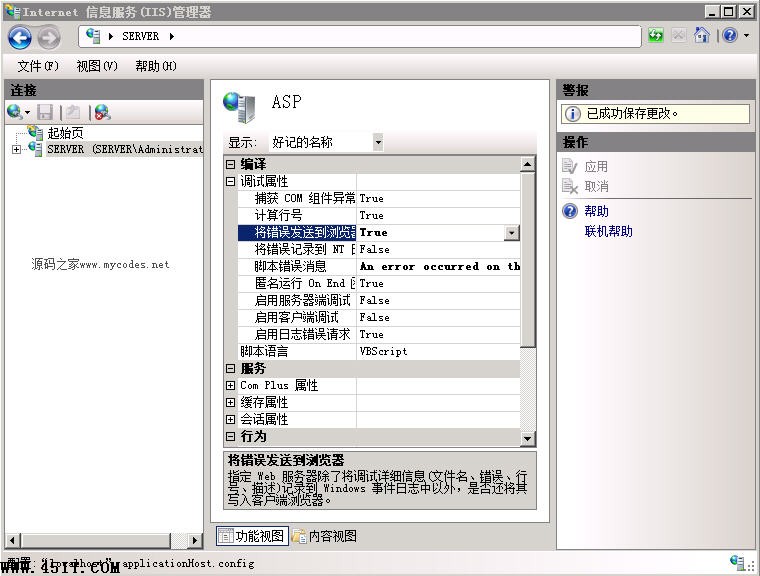
  4. 展開 偵錯屬性 (Debugging Properties) 群組。
  5. 將 將錯誤傳送至瀏覽器 (Send Errors To Browser) 從 False 改為 True。
  6. 點擊右側動作欄的 套用。
IIS 7 ASP 設定:將錯誤傳送至瀏覽器設為 True

IIS 7.0 ASP 設定介面:展開偵錯屬性 → 將錯誤傳送至瀏覽器 = True
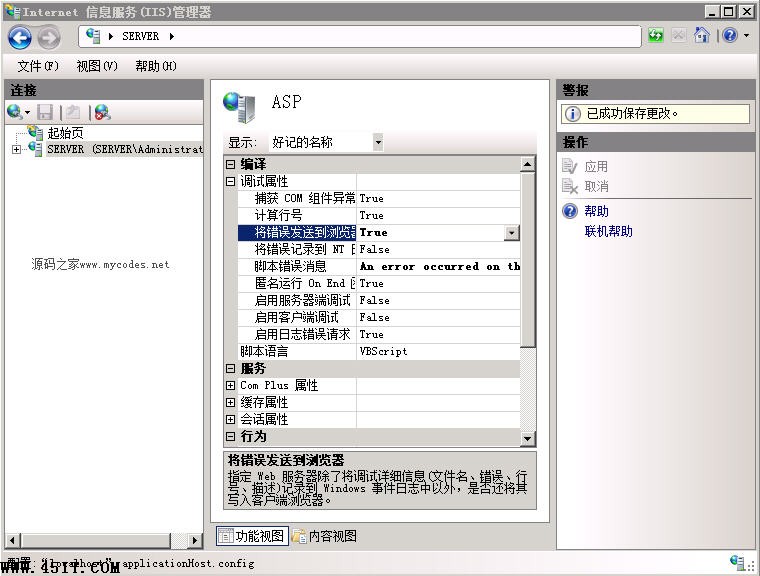
IIS 7.5 相同設定介面

IIS 7.5 相同設定位置

驗證與安全性提醒

  • 設定完成後,重新整理出錯的 ASP 頁面,即可看到完整錯誤資訊(錯誤類型、行號、原始碼片段、ASP 描述)。
  • 生產環境強烈建議關閉此選項 (False),避免敏感資訊 (資料庫連線字串、路徑、程式碼邏輯) 洩露予攻擊者。
  • 可搭配 web.config 中 <httpErrors errorMode="DetailedLocalOnly"> 僅在本機顯示詳細錯誤,遠端仍顯示友善頁面。

適用範圍

Windows Server 2008 (IIS 7.0)、Windows Server 2008 R2 (IIS 7.5)、Windows 7 (IIS 7.5) 等所有支援 ASP 的 IIS 7+ 版本。


Copyright © Windows教程網 All Rights Reserved