LNMMP = Linux + Nginx + Memcached + MySQL + PHP,即經典 LNMP 加入 Memcached 記憶體快取層,適用於高併發動態 Web 應用。
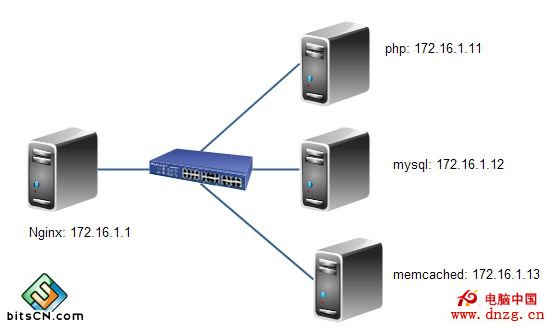
# 1. 開發工具與依賴
yum -y groupinstall "Development Tools" "Server Platform Development"
yum -y install pcre-devel openssl-devel

# 2. 建立執行使用者
groupadd -r nginx
useradd -r -g nginx -s /sbin/nologin nginx

# 3. 編譯參數
tar xf nginx-1.4.7.tar.gz && cd nginx-1.4.7
./configure \
  --prefix=/usr \
  --sbin-path=/usr/sbin/nginx \
  --conf-path=/etc/nginx/nginx.conf \
  --error-log-path=/var/log/nginx/error.log \
  --http-log-path=/var/log/nginx/access.log \
  --pid-path=/var/run/nginx/nginx.pid \
  --lock-path=/var/lock/nginx.lock \
  --user=nginx --group=nginx \
  --with-http_ssl_module \
  --with-http_flv_module \
  --with-http_stub_status_module \
  --with-http_gzip_static_module \
  --http-client-body-temp-path=/var/tmp/nginx/client \
  --http-proxy-temp-path=/var/tmp/nginx/proxy \
  --http-fastcgi-temp-path=/var/tmp/nginx/fcgi \
  --http-uwsgi-temp-path=/var/tmp/nginx/uwsgi \
  --http-scgi-temp-path=/var/tmp/nginx/scgi \
  --with-pcre
make && make install

# 4. 語法檢查與啟動腳本
/usr/sbin/nginx -t
# 建立 /etc/rc.d/init.d/nginx (SysV 風格,含 make_dirs/start/stop/reload/configtest)
chmod +x /etc/rc.d/init.d/nginx
chkconfig --add nginx && chkconfig nginx on

# 5. Vim 語法高亮
mkdir -p ~/.vim/syntax
cd ~/.vim/syntax
wget -O nginx.vim "https://www.vim.org/scripts/download_script.php?src_id=19394"
echo 'au BufRead,BufNewFile /etc/nginx/*,/usr/local/nginx/conf/* if &ft == "" | setfiletype nginx | endif' >> ~/.vim/filetype.vim

# 6. 啟動
service nginx start
ss -tnalp | grep nginxtar xf mysql-5.5.33-linux2.6-x86_64.tar.gz -C /usr/local
ln -sv /usr/local/mysql-5.5.33-linux2.6-x86_64 /usr/local/mysql
mkdir -p /mydata/data
groupadd -r mysql
useradd -r -g mysql -s /sbin/nologin -d /mydata/data mysql
chown -R mysql:mysql /mydata/data
cd /usr/local/mysql
scripts/mysql_install_db --datadir=/mydata/data --user=mysql
chown -R root .
cp support-files/mysql.server /etc/rc.d/init.d/mysqld
chmod +x /etc/rc.d/init.d/mysqld
chkconfig --add mysqld && chkconfig mysqld on
cp support-files/my-large.cnf /etc/my.cnf
# 編輯 /etc/my.cnf
thread_concurrency = 2
datadir = /mydata/data
# 環境變數與庫路徑
echo 'export PATH=/usr/local/mysql/bin:$PATH' > /etc/profile.d/mysql.sh
source /etc/profile.d/mysql.sh
echo '/usr/local/mysql/lib' > /etc/ld.so.conf.d/mysql.conf
ldconfig
ln -sv /usr/local/mysql/include /usr/include/mysql
ln -sv /usr/local/mysql/man /usr/share/man
service mysqld start
# 初始化 root 密碼、移除匿名帳號、刪除 test 資料庫yum -y install bzip2-devel libmcrypt-devel
yum -y groupinstall "Desktop Platform Development"
tar xf php-5.4.26.tar.bz2 && cd php-5.4.26
./configure \
--prefix=/usr/local/php \
--with-openssl \
--with-mysql=mysqlnd --with-mysqli=mysqlnd --with-pdo-mysql=mysqlnd \
--enable-mbstring \
--with-freetype-dir --with-jpeg-dir --with-png-dir \
--with-zlib --with-libxml-dir=/usr --enable-xml \
--enable-sockets \
--with-mcrypt \
--with-config-file-path=/etc --with-config-file-scan-dir=/etc/php.d \
--with-bz2 --enable-maintainer-zts
make && make install
cp php.ini-production /etc/php.ini
cp sapi/fpm/init.d.php-fpm /etc/rc.d/init.d/php-fpm
chmod +x /etc/rc.d/init.d/php-fpm
chkconfig --add php-fpm && chkconfig php-fpm on
cp /usr/local/php/etc/php-fpm.conf.default /usr/local/php/etc/php-fpm.conf
# 編輯 php-fpm.conf
pm.max_children = 150
pm.start_servers = 8
pm.min_spare_servers = 5
pm.max_spare_servers = 10
pid = /usr/local/php/var/run/php-fpm.pid
listen = 172.16.1.11:9000 # 或 unix socket
service php-fpm starttar xf xcache-3.0.3.tar.gz && cd xcache-3.0.3
/usr/local/php/bin/phpize
./configure --enable-xcache --with-php-config=/usr/local/php/bin/php-config
make && make install
# 記錄模組路徑:/usr/local/php/lib/php/extensions/no-debug-zts-20100525/xcache.so
echo 'extension = /usr/local/php/lib/php/extensions/no-debug-zts-20100525/xcache.so' > /etc/php.d/xcache.ini
service php-fpm restart# /etc/nginx/nginx.conf
worker_processes 2;
error_log /var/log/nginx/error.log notice;
events { worker_connections 1024; }
http {
include mime.types;
default_type application/octet-stream;
sendfile on;
keepalive_timeout 5;
gzip on;
server {
listen 80;
server_name www.hoo.com;
add_header X-Via $server_addr;
location / {
root html;
index index.php index.html index.htm;
}
# 靜態資源直接由 Nginx 服務
location ~* \.(jpg|jpeg|png|gif|js|css)$ {
root html;
expires 30d;
access_log off;
}
# 動態 PHP 轉發至 PHP-FPM
location ~ \.php$ {
root html;
fastcgi_pass 172.16.7.11:9000;
fastcgi_index index.php;
fastcgi_param SCRIPT_FILENAME $document_root$fastcgi_script_name;
include fastcgi_params;
}
}
}
# /etc/nginx/fastcgi_params 保持標準參數
fastcgi_param QUERY_STRING $query_string;
fastcgi_param REQUEST_METHOD $request_method;
fastcgi_param CONTENT_TYPE $content_type;
fastcgi_param CONTENT_LENGTH $content_length;
fastcgi_param SCRIPT_FILENAME $document_root$fastcgi_script_name;
fastcgi_param SCRIPT_NAME $fastcgi_script_name;
fastcgi_param REQUEST_URI $request_uri;
fastcgi_param DOCUMENT_URI $document_uri;
fastcgi_param DOCUMENT_ROOT $document_root;
fastcgi_param SERVER_PROTOCOL $server_protocol;
fastcgi_param REMOTE_ADDR $remote_addr;
fastcgi_param REMOTE_PORT $remote_port;
fastcgi_param SERVER_ADDR $server_addr;
fastcgi_param SERVER_PORT $server_port;
fastcgi_param SERVER_NAME $server_name;
service nginx reloadyum -y groupinstall "Development Tools" "Server Platform Development"
yum -y install libevent-devel
tar xf memcached-1.4.15.tar.gz && cd memcached-1.4.15
./configure --prefix=/usr/local/memcached --with-libevent=/usr/local/libevent
make && make install
# 啟動腳本 /etc/init.d/memcached (含 daemon、pid、lock、PORT/USER/CACHESIZE 參數)
chmod +x /etc/init.d/memcached
chkconfig --add memcached
service memcached start
ss -tnlp | grep 11211tar xf memcache-2.2.7.tgz && cd memcache-2.2.7
/usr/local/php/bin/phpize
./configure --with-php-config=/usr/local/php/bin/php-config --enable-memcache
make && make install
echo 'extension = /usr/local/php/lib/php/extensions/no-debug-zts-20100525/memcache.so' > /etc/php.d/memcache.ini
service php-fpm restart# PHP 端測試腳本 /usr/local/nginx/html/test.php
connect('172.16.1.13', 11211) or die("Could not connect");
echo "Server's version: " . $mem->getVersion() . "
";
$mem->set('hellokey', 'Hello World', 0, 600) or die("Failed to save");
echo "Store data in cache (expire 600s)
";
echo $mem->get('hellokey') . " is from memcached server.";
?>
# 瀏覽器訪問 https://www.hoo.com/test.php
# WordPress 實測
# 解壓 WordPress 至 html 目錄,配置 wp-config.php 連接 MySQL,完成安裝向導
# Memadmin 監控介面
unzip memadmin-master.zip -d /usr/local/nginx/html/
# 訪問 https://www.hoo.com/memadmin-master/完成上述全棧編譯部署,擁有高效能 Nginx 靜態服務、PHP-FPM 動態處理、XCache Opcode 加速、Memcached 分散式快取與 MySQL 持久化儲存的生產級 LNMMP 平台。後續可導入 Nginx FastCGI 快取、MySQL 讀寫分離、多節點負載均衡等進階優化。