在 Bash 腳本中引入圖形或終端對話框,能顯著提升用戶體驗。Zenity 基於 GTK 提供原生圖形界面,適合桌面環境;Whiptail 基於新終端庫(newt)在純文本終端繪製對話框,適合無形界面的服務器或 SSH 會話。
sudo apt-get install zenity    # Debian/Ubuntu
sudo dnf install zenity        # Fedora/RHEL
| 類型 | 命令範例 | 說明 |
|---|---|---|
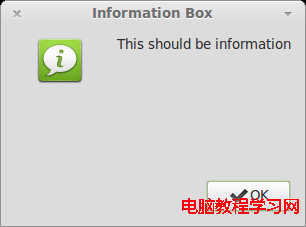
| 信息框 | zenity --info --title "提示" --text "操作成功" --width=300 --height=200 | 單純提示,確定關閉 |
| 詢問框 | zenity --question --text "繼續嗎?" --ok-label "是" --cancel-label "否" | 返回碼 0=確定, 1=取消 |
| 輸入框 | ans=$(zenity --entry --title "輸入" --text "請輸入名稱" --width=300) | 輸出用戶輸入字符串 |
| 錯誤框 | zenity --error --text "發生錯誤: $ERR_MSG" | 紅色圖標,強調錯誤 |
| 進度條 | (for i in {1..100}; do echo $i; sleep 0.1; done) | zenity --progress --title "處理中" --percentage=0 --auto-close | 管道輸入百分比數字 |
| 文件選擇 | file=$(zenity --file-selection --title "選擇文件" --file-filter="*.txt") | 返回選中文件絕對路徑 |
| 日曆 | date=$(zenity --calendar --title "選擇日期" --date-format="%Y-%m-%d") | 返回格式化日期字符串 |
#!/bin/bash
zenity --question --text "開始收集信息?" || exit 1

FIRST=$(zenity --entry --title "名" --text "請輸入名:" --width=300)
LAST=$(zenity --entry --title "姓" --text "請輸入姓:" --width=300)
AGE=$(zenity --entry --title "年齡" --text "請輸入年齡:" --width=300)

zenity --info --title "結果" --text "您是 ${FIRST} ${LAST},${AGE} 歲。" --width=300
sudo apt-get install whiptail   # 通常預裝於 Debian/Ubuntu
sudo dnf install newt           # Fedora/RHEL (提供 whiptail)
Whiptail 將對話框 UI 繪製到 stdout,將用戶輸入結果輸出到 stderr。直接命令替換 var=$(whiptail ...) 會導致 UI 消失且變量為空。解決方案:交換 stdout/stderr:
var=$(whiptail --inputbox "輸入:" 10 40 "默認值" 3>&1 1>&2 2>&3)
| 類型 | 命令範例 |
|---|---|
| 消息框 | whiptail --msgbox "處理完成" 10 40 |
| 是/否框 | whiptail --yesno "確定刪除?" 10 40 --yes-button "刪除" --no-button "取消" |
| 輸入框 | val=$(whiptail --inputbox "數字:" 10 40 "100" 3>&1 1>&2 2>&3) |
| 菜單框 | opt=$(whiptail --menu "選擇:" 20 60 10 "1" "選項一" "2" "選項二" 3>&1 1>&2 2>&3) |
| 密碼框 | pwd=$(whiptail --passwordbox "密碼:" 10 40 3>&1 1>&2 2>&3) |
| 清單框 | whiptail --checklist "選擇:" 20 60 10 "tag1" "項目1" ON "tag2" "項目2" OFF 3>&1 1>&2 2>&3 |
#!/bin/bash
DIR=$(whiptail --title "目錄大小" --inputbox "輸入路徑:" 10 50 "/home" 3>&1 1>&2 2>&3)
[ $? -ne 0 ] && exit 1

if [ -d "$DIR" ]; then
    SIZE=$(du -sh "$DIR" | awk '{print $1}')
    whiptail --msgbox "目錄 $DIR 大小: $SIZE" 10 50
elif [ -f "$DIR" ]; then
    whiptail --msgbox "這是文件而非目錄!" 10 50
else
    whiptail --msgbox "路徑不存在!" 10 50
fi
$DISPLAY 或 which zenity 動態選擇,或提供 --text 降級模式。