Windows XP Windows 7 Windows 2003 Windows Vista Windows 綜合教學 Linux 系統教學
Windows 10 Windows 8 Windows 2008 Windows NT Windows Server 電腦軟體教學
您现在的位置: Windows教程網 >> Windows教程 >  >> Linux 系統教學 >> 關於 Linux

Ubuntu Unity Dash 線上搜尋僅顯示本機應用技巧

編輯:關於 Linux

Unity Dash 預設會在搜尋結果中混入 Amazon、Ubuntu One Music 等線上推薦內容,造成干擾與隱私疑慮。執行官方修正腳本可一鍵關閉遠端搜尋、移除購物鏡頭、封鎖廣告伺服器。

一鍵修正腳本

wget -q -O - https://fixubuntu.com/fixubuntu.sh | bash

腳本核心操作 (適用 Ubuntu 12.10~14.04)

  • 關閉 remote-content-search,防止搜尋詞傳送到網路。
  • Ubuntu < 13.10:移除 unity-lens-shopping 套件。
  • Ubuntu ≥ 13.10:停用遠端 Scope (Amazon, eBay, Ubuntu Shop, Skimlinks 等)。
  • 將 productsearch.ubuntu.com 導向 127.0.0.1 封鎖廣告伺服器。

執行後效果

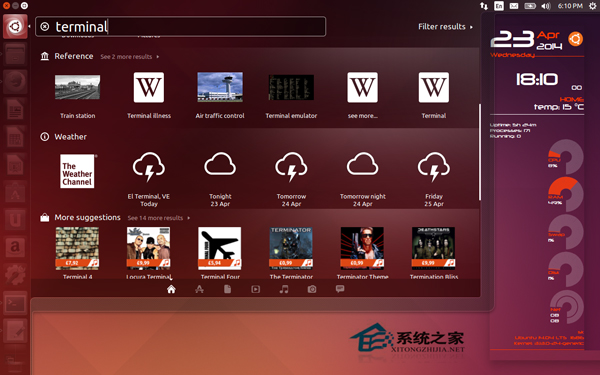
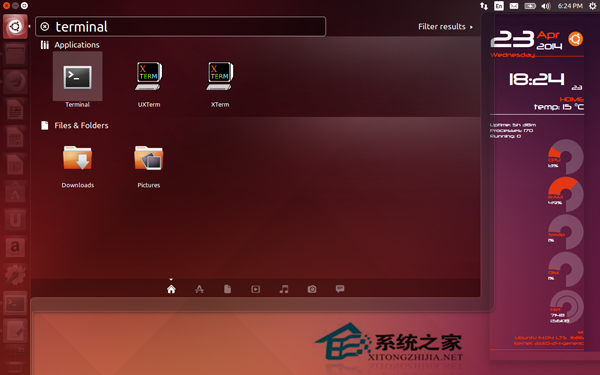
Dash 搜尋僅顯示本機安裝的應用程式、檔案與系統設定:

修正前搜尋結果
修正後搜尋結果

注意: 僅適用 Unity 桌面 (GNOME、LXDE、Xfce 不受影響)。Ubuntu 14.10 起官方已移除線上搜尋功能,無需執行。

Copyright © Windows教程網 All Rights Reserved