編譯核心產生的 RPM 版本號尾端多出 +(如 3.10.28+),通常因 Git 倉庫有未提交變更。

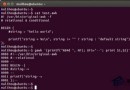
Makefile 定義 VERSION、PATCHLEVEL、SUBLEVEL、EXTRAVERSION。scripts/setlocalversion 若偵測到 CONFIG_LOCALVERSION_AUTO=y 且 Git 非乾淨狀態,會在版本後附加 +。LOCALVERSION= makeCONFIG_LOCALVERSION_AUTO(make menuconfig → General setup → 取消 Local version - append to kernel release)。git rev-parse --verify --short HEAD # 短雜湊
git log --pretty=format:'%h' -n 1 # 同樣結果理解版本號生成邏輯,以 LOCALVERSION= 或關閉自動附加,即可產出乾淨版本號的核心套件。