Autossh 是一套監控 SSH 連線狀態、自動重連、維持反向/正向隧道存活的工具。適用於不穩定網路環境、跳板機隧道、內網穿透、遠端日誌收集等場景。本文涵蓋主流發行版安裝方式、原始碼編譯、systemd 服務化部署與核心參數調優。
| 發行版 | 安裝指令 | 備註 |
|---|---|---|
| Debian / Ubuntu | sudo apt-get install autossh |
官方倉庫內建 |
| Fedora | sudo dnf install autossh |
官方倉庫內建 |
| CentOS / RHEL 6/7 | sudo yum install autossh |
需啟用 EPEL / Repoforge |
| CentOS / RHEL 8/9 | 無預編譯套件 | 需原始碼編譯 (見下) |
| Arch Linux | sudo pacman -S autossh |
官方倉庫內建 |
# 安裝建置工具
# Debian/Ubuntu
sudo apt-get install gcc make
# CentOS/RHEL
sudo yum install gcc make

# 下載原始碼 (官網最新版 1.4g)
wget https://www.harding.motd.ca/autossh/autossh-1.4g.tgz
tar -xf autossh-1.4g.tgz
cd autossh-1.4g

# 編譯安裝
./configure
make
sudo make install
# 預設安裝至 /usr/local/bin/autossh| 參數 | 說明 | 建議值 |
|---|---|---|
-M |
監控埠 (雙向 echo 服務),0 表示關閉,改用 SSH 內建 ServerAliveInterval |
-M 0 |
-f |
背景執行 (fork to background) | 生產環境必加 |
-N |
不執行遠端指令,僅建立隧道 | 隧道模式必加 |
-o "ServerAliveInterval=30" |
每 30 秒發送保活封包 | 防火牆/NAT 斷開偵測 |
-o "ServerAliveCountMax=3" |
3 次無回應視為斷線 | 觸發 autossh 重連 |
-o "ExitOnForwardFailure=yes" |
端口轉發失敗即退出 | 避免靜默失敗 |
-R |
反向隧道 (遠端→本地) | 內網穿透核心參數 |
-L |
正向隧道 (本地→遠端) | 跳板機存取內網服務 |
sudo vim /etc/systemd/system/autossh-tunnel.service[Unit]
Description=AutoSSH Reverse Tunnel to Jump Host
After=network.target
[Service]
User=autossh
Environment="AUTOSSH_GATETIME=0"
Environment="AUTOSSH_POLL=60"
Environment="AUTOSSH_FIRST_POLL=30"
Environment="AUTOSSH_LOGLEVEL=7"
Environment="AUTOSSH_LOGFILE=/var/log/autossh.log"
ExecStart=/usr/local/bin/autossh -M 0 -f -N \
-o "ServerAliveInterval=30" \
-o "ServerAliveCountMax=3" \
-o "ExitOnForwardFailure=yes" \
-o "StrictHostKeyChecking=no" \
-o "UserKnownHostsFile=/dev/null" \
-i /home/autossh/.ssh/id_rsa \
-R 2222:localhost:22 \
autossh@jump-host.example.com
Restart=always
RestartSec=10
[Install]
WantedBy=multi-user.targetsudo systemctl daemon-reload
sudo systemctl enable autossh-tunnel
sudo systemctl start autossh-tunnel
sudo systemctl status autossh-tunnel
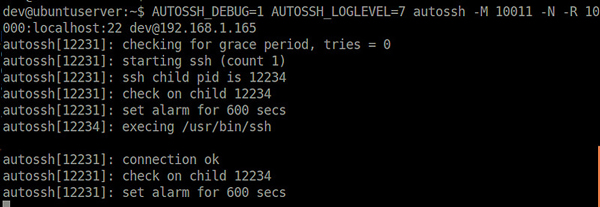
journalctl -u autossh-tunnel -fAUTOSSH_GATETIME=0:關閉啟動門檻檢查 (避免首次連線慢被誤判)AUTOSSH_POLL=60:輪詢間隔 60 秒AUTOSSH_LOGLEVEL=7:詳細除錯日誌AUTOSSH_PATH:指定 ssh 執行檔路徑 (非標準位置時)autossh-tunnel-)systemd 模板單元 (autossh-tunnel@.service) 參數化管理monit 或 Prometheus node_exporter 監控連線狀態Autossh + systemd 讓 SSH 隧道具備生產級的高可用性,是維運自動化、混合雲互聯、內網服務暴露的基石工具。