source(別名 .)是 Shell 內建命令,用於在**當前 Shell 進程**中讀取並執行指定文件中的命令,使變量定義、函數、別名等立即生效,無需重新登錄或重啟。本文詳解語法、典型應用場景、內核編譯自動化腳本示例及常見報錯排查。
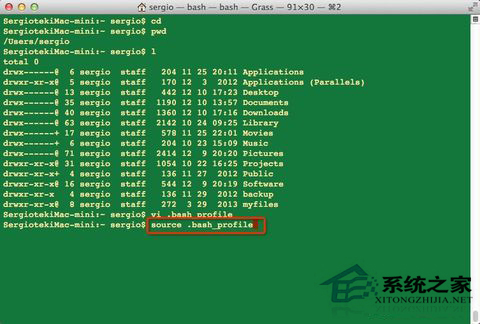
source filename
# 或
. filename
# 注意:. 與 filename 之間有空格
若 filename 為相對路徑,會在 $PATH 目錄中查找;建議使用絕對路徑:source /etc/profile。
對比:
./script.sh:啟動**子 Shell** 執行,子 Shell 中的 export VAR=value **不會**回傳給父 Shell。source script.sh:在**當前 Shell** 執行,所有變量、函數、別名直接修改當前環境。vim ~/.bashrc
# 添加 alias ll='ls -alF'
source ~/.bashrc
# 當前終端即可使用 ll
# .env 文件內容:
# export DB_HOST=localhost
# export DB_PASS=secret

source .env
echo $DB_HOST  # 輸出 localhost
創建編譯腳本 make_kernel.sh:
#!/bin/bash
# 使用 && 串聯:前一條成功才執行後一條
make mrproper &&
make menuconfig &&
make -j$(nproc) &&
make modules_install &&
make install
賦予執行權限並運行:
chmod +x make_kernel.sh
source make_kernel.sh
# 或直接 ./make_kernel.sh(因為是腳本文件,source 與執行效果相同,但 source 可在腳本中修改當前 Shell 變量)
進階:若腳本中需修改當前 Shell 變量(如 export KERNEL_VERSION=5.15.0),必須用 source。
# ~/.bashrc
source ~/.bash_aliases
source ~/.bash_functions
source ~/.bash_prompt
[ -f ~/.localrc ] && source ~/.localrc   # 機器特有配置
現象:執行 source xxx 提示 source: command not found 或 .: command not found。
原因:當前 Shell 非 Bash/Zsh(如 sh、dash),或 PATH 丟失導致內建命令不可用(極罕見)。
解決:
# 確保使用 Bash/Zsh
echo $SHELL
# /bin/bash 或 /bin/zsh

# 臨時修復 PATH
export PATH=/usr/local/sbin:/usr/local/bin:/usr/sbin:/usr/bin:/sbin:/bin

# 腳本頂部聲明 #!/bin/bash
| 特性 | source file | exec file |
|---|---|---|
| 進程 | 當前 Shell | 替換當前 Shell(PID 不變,但代碼段換新程序) |
| 返回 | 執行完返回繼續 | 不返回,原 Shell 結束 |
| 用途 | 載入配置、函數 | 啟動主程序、容器入口 |
source ~/.bashrc、source /etc/profile。PS1。熟練使用 source 能讓 Shell 環境管理更靈活、調試更高效,是 Linux 開發運維的必備基本功。