Byobu 是 screen 的增強版封裝,提供 F2~F9 快捷鍵管理視窗、F12 鎖定終端、底部狀態列顯示 CPU/記憶體/時間等資訊。本文示範 Ubuntu 12.04 透過 apt 與原始碼兩種方式安裝 Byobu,並實戰演示多視窗切換、同時運行 top 與 uptime 等多工操作。
# 套件管理器安裝(推薦)
sudo apt-get install screen byobu

# 原始碼安裝
cd /usr/local/src
sudo wget https://launchpadlibrarian.net/130760729/byobu_5.33.orig.tar.gz
sudo tar zxvf byobu_5.33.orig.tar.gz
cd byobu_5.33 && ./configure && make && sudo make install| 按鍵 | 功能 |
|---|---|
| F2 | 開啟新視窗 |
| F3 | 切換至上一個視窗 |
| F4 | 切換至下一個視窗 |
| F8 | 重命名視窗 |
| F9 | 開啟設定選單 |
| F12 | 鎖定終端(需密碼解鎖) |
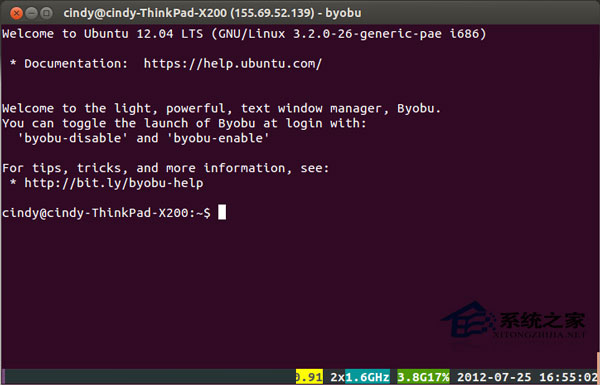
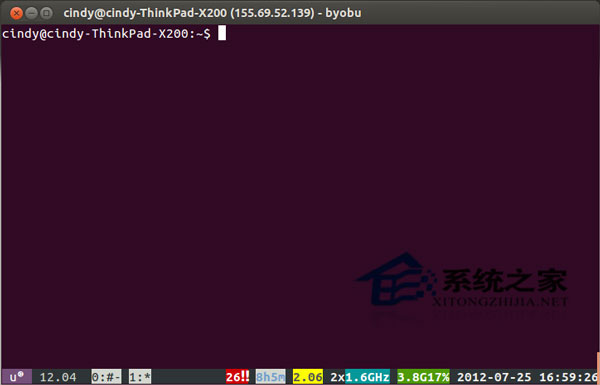
Byobu 讓單一 SSH 連線即可同時處理多項任務,避免開啟多條連線浪費資源,是遠端維運人員必備工具。