雙點擊 .reg 檔匯入登錄檔後,通常需重新載入 explorer.exe、登出或重開機才能生效,相當麻煩。將 .reg 轉為 .bat 批次檔並執行,即可在匯入後自動重啟 Explorer,讓設定立即生效。
REG轉BAT.bat,內容如下:@echo off copy %1 reg.bat echo regedit /s %1 >> reg.bat echo taskkill /f /im explorer.exe >> reg.bat echo start explorer.exe >> reg.bat
F:\BAT)。REG轉BAT.bat,資料夾下會產生 reg.bat。reg.bat,即會匯入登錄檔並自動重啟 Explorer,設定即時生效。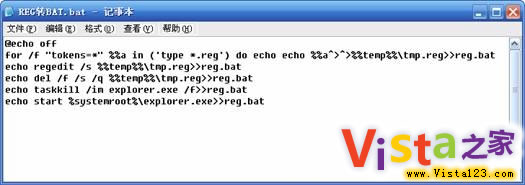
適用 Windows XP、Vista、Windows 7 等版本。善用此技巧,登錄檔調整不再需要繁瑕的重啟流程。