Windows XP Windows 7 Windows 2003 Windows Vista Windows 綜合教學 Linux 系統教學
Windows 10 Windows 8 Windows 2008 Windows NT Windows Server 電腦軟體教學

Runas + 批次檔:Windows XP 多用戶環境一鍵切換桌面實戰

編輯:XP 系統基礎知識

XP 多用戶環境下,「我的文件」設為私用資料夾(需 NTFS)可保護隱私。但需存取他人私用資料時,Win+L 切換用戶會中斷網路連線。利用 runas + 批次檔實現**當前桌面下一鍵切換用戶環境**,不中斷網路、不登出。

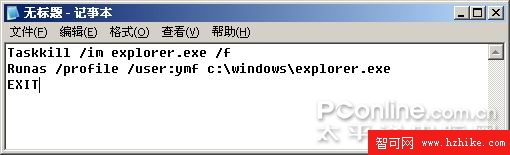
批次檔製作(qiehuan.bat)

taskkill /im explorer.exe /f
runas /profile /user:ymf c:\Windows\explorer.exe
exit
  • /im explorer.exe:指定終止桌面進程
  • /f:強制終止
  • /profile:載入目標用戶設定檔(關鍵:能存取私用資料夾)
  • /user:ymf:目標用戶帳號
批次檔內容

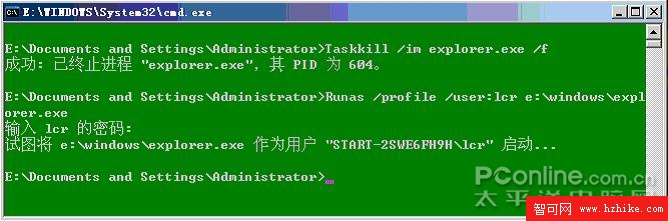
實戰操作

  1. 執行 qiehuan.bat,系統關閉當前桌面
  2. 命令提示字元輸入目標用戶密碼
  3. 新桌面載入完成,以目標用戶身分運行,可存取其私用資料夾、編輯其登錄
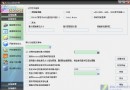
輸入密碼提示
圖 2

進階應用與替代方案

  • 製作對應批次檔切回原用戶(修改 /user: 參數),實現雙向快速切換
  • 前提:需知目標用戶密碼(無密碼帳號無法使用)
  • 替代方案:管理員身分執行 cacls "C:\Documents and Settings\ymf" /e /p administrator:f 賦予當前用戶完全控制權限,再製作腳本快速存取。但需逐個資料夾設定權限。

Copyright © Windows教程網 All Rights Reserved