隨著使用時間增長,Windows XP 系統目錄會膨脹至 1.4 GB 以上。透過以下選擇性步驟,可將佔用壓縮至 900 MB 以下(實測 918 MB)。
執行 sfc.exe /purgecache(開始→執行),可刪除約 300 MB 的系統檔案備份。
刪除 %Windows%\Driver Cache\i386\driver.cab(約 76 MB)。注意:日後重裝驅動需插入 XP 光碟或備妥 i386 資料夾。
刪除 %Windows%\Help 目錄(約 40 MB),視個人習慣決定。
刪除 %Windows%\$NtUninstallQxxxxxx$ 類目錄(每個 10–30 MB)。安裝更新時可勾選「不儲存解除安裝資訊」避免產生。
若有多作業系統,將所有 pagefile.sys 指向同一分區:控制台→系統→效能→虛擬記憶體→變更,設定後重啟生效。
編輯 %Windows%\inf\sysoc.inf,將 ,hide 全部取代為空白,重開「新增/移除程式」→「新增/移除 Windows 元件」,即可移除遊戲、Messenger、碼表等不需組件。
刪除 \Windows\ime 下日文 (IMJP8_1)、韓文 (IMKR6_1) 輸入法(約 80 MB)。先清 \WinDOS\system32\dllcache 同名檔,再刪除目錄。
右鍵磁碟→內容→勾選「壓縮磁碟機以節省空間」,約再省 20% 空間,但會稍增 CPU 負載。
右鍵「我的電腦」→內容→系統還原→「在所有磁碟機上關閉系統還原」。建議改用 Ghost 等映像備份工具。
使用搜尋功能找出 >50 MB 的檔案,人工判斷刪除。
開啟 regedit,刪除 HKEY_CURRENT_USER\Software\Microsoft\Windows\CurrentVersion\Run 下的 MSMSGS (Messenger)、ctfmon 等非必要項。
修改 HKEY_LOCAL_MACHINE\SYSTEM\CurrentControlSet\Control\Session Manager\Memory Management\PrefetchParameters\EnablePrefetcher 為 1(僅預讀應用程式),可減少開機進度條等待圈數。不常換硬體者,可在裝置管理器將總線類型設為「無」。
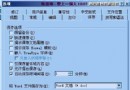
系統內容→進階→效能→設定→「調整為最佳效能」。建議保留:「視窗和按鈕使用視覺樣式」、「資料夾常見工作」、「桌面圖示陰影」。
執行 regsvr32 /u zipfldr.dll 取消註冊,減少資源佔用。
執行 gpedit.msc → 電腦設定→管理範本→網路→QoS 封包排程器→「限制可保留頻寬」→「已停用」。並移除網路連線內的 QoS 協定。
刪除登錄 HKEY_LOCAL_MACHINE\Software\Microsoft\Windows\Current Version\Explorer\RemoteComputer\NameSpace\{D6277990-4C6A-11CF-87-00AA0060F5BF},重啟後不再檢查遠端排程任務,存取明顯加快。
修改 HKEY_LOCAL_MACHINE\SOFTWARE\Microsoft\Windows NT\CurrentVersion\AeDebug\Auto 為 0;系統內容→進階→啟動與修復→「寫入偵錯資訊」選「無」。
以下服務多為預設啟用但鮮少用到,建議視需求設為「手動」或「停用」:
Alerter, Automatic Updates, Background Intelligent Transfer, ClipBook, Computer Browser, DHCP Client, Distributed Link Tracking Client, Distributed Transaction Coordinator, DNS Client, Error Reporting, Event Log, Fast User Switching, Help and Support, Human Interface Device Access, IMAPI CD-Burning, Indexing Service, Internet Connection Firewall, IPSEC Services, Logical Disk Manager Admin, Messenger, MS Software Shadow Copy, Net Logon, NetMeeting Remote Desktop, Network DDE, Network DDE DSDM, Network Location Awareness, NTLM Security Support, Performance Logs and Alerts, Portable Media Serial Number, Print Spooler, QoS RSVP, Remote Desktop Help, Remote Procedure Call Locator, Remote Registry, Removable Storage, Routing and Remote Access, Security Accounts Manager, Smart Card, Smart Card Helper, SSDP Discovery, System Event Notification, System Restore, Task Scheduler, Telephony, Telnet, Terminal Services, UPS, UPnP Device Host, Upload Manager, Volume Shadow Copy, WebClient, Windows Installer, Windows Image Acquisition, WMI Driver Extensions, Windows Time, Wireless Zero Configuration, WMI Performance Adapter
操作:services.msc → 右鍵服務→內容→啟動類型改「手動」→停止。
Windows Registry Editor Version 5.00
[HKEY_LOCAL_MACHINE\SYSTEM\CurrentControlSet\Services\lanmanserver\parameters]
"AutoShareServer"=dword:00000000
"AutoShareWks"=dword:00000000
Windows Registry Editor Version 5.00
[HKEY_LOCAL_MACHINE\SYSTEM\CurrentControlSet\Control\Lsa]
"restrictanonymous"=dword:00000001
依自身環境挑選執行,即可兼顧空間、速度與安全。