Windows XP Windows 7 Windows 2003 Windows Vista Windows 綜合教學 Linux 系統教學
Windows 10 Windows 8 Windows 2008 Windows NT Windows Server 電腦軟體教學

解鎖 Windows XP 隱藏元件:修改 Sysoc.inf 讓終端服務、Messenger 現身

編輯:XP 系統基礎知識

「新增/移除 Windows 元件」精靈預設隱藏了部分元件(如終端服務、Windows Messenger、MSN Explorer 等)。只需修改 Sysoc.inf,移除 hide 標記,即可讓所有元件現身供安裝或移除。

操作步驟

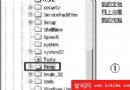
  1. 開啟資源管理器,進入 C:\Windows\Inf(若安裝在其他槽請對應修改)。
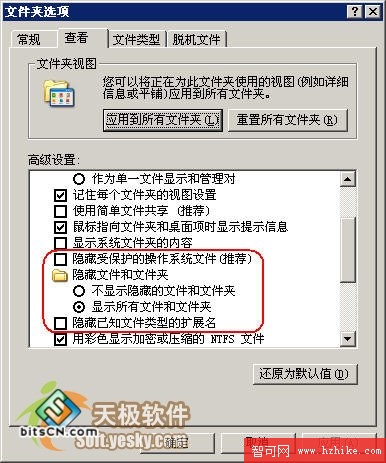
    若看不到 Inf 資料夾:
    「工具」→「資料夾選項」→「檢視」→ 取消「隱藏受保護的作業系統檔案」、勾選「顯示所有檔案和資料夾」。
  2. 資料夾選項設定
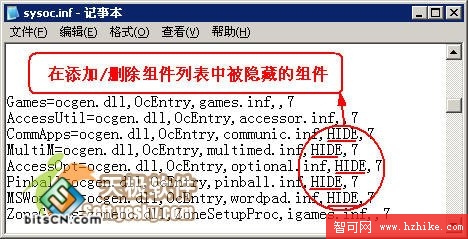
  3. 找到 Sysoc.inf,複製一份備份(如 Sysoc.inf.bak)。
  4. Sysoc.inf 檔案
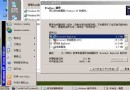
  5. 用記事本開啟 Sysoc.inf。
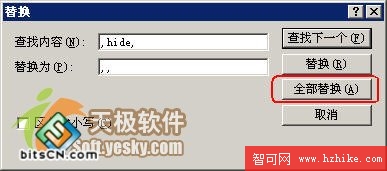
  6. Ctrl+H 開啟「取代」:
    尋找: ,hide,
    取代為: ,,
    點選「全部取代」。
  7. 取代 hide 標記
  8. Ctrl+S 存檔。

效果

重新開啟「新增/移除 Windows 元件」,原本隱藏的項目(終端服務、Messenger、MSN Explorer 等)將出現在清單中,可自由勾選安裝或移除。
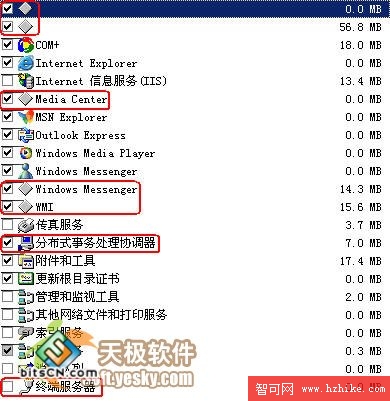
顯示隱藏元件後的清單

風險提醒

  • 移除核心元件可能導致系統不穩,請先做好 Sysoc.inf 備份。
  • 若出問題,刪除修改後的檔案,將備份改回 Sysoc.inf 即可還原。
  • 不確定的元件建議保留,切勿嘗試移除。
Copyright © Windows教程網 All Rights Reserved