同前文,解法:格式化 → 裝 SP2 → 升級 SP3,前先 Ghost 備份。
同前文,含標準 Boot.ini 內容、PE/DOS/復原主控台多種修復法、hal.dll 關聯說明、建立檔案截圖示意。
同前文,含 net user 指令、建新管理員帳號、EFS 加密風險警示。
同前文,kernel32.dll 替換步驟。
現象:註冊表損壞導致無法啟動。
解決:進入復原主控台,光碟機代號 X:,依序執行:
delete C:\Windows\System32\Config\System
delete C:\Windows\System32\Config\Software
delete C:\Windows\System32\Config\Sam
delete C:\Windows\System32\Config\Security
delete C:\Windows\System32\Config\Default
copy X:\Windows\Repair\System C:\Windows\System32\Config\System
copy X:\Windows\Repair\Software C:\Windows\System32\Config\Software
copy X:\Windows\Repair\Sam C:\Windows\System32\Config\Sam
copy X:\Windows\Repair\Security C:\Windows\System32\Config\Security
copy X:\Windows\Repair\Default C:\Windows\System32\Config\Default
代價:還原至 XP 初次安裝狀態,安裝後所有設定變更將遺失。
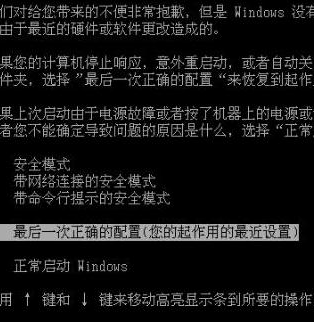
現象:選擇該選項仍報錯 Windows NT could not start... \System32\Config\System\Hardware profile\Last known Good menu。
原因:註冊表損壞。
解決:復原主控台進入 C:\Windows\Repair,執行 copy *.* C:\Windows\System32\Config 覆蓋損壞註冊表,同樣會遺失安裝後設定。
現象:C 槽 XP 基礎上 D 槽裝 Win2000 後,無法進入 XP。
原因:Win2000 開機程式無法引導已修改的 XP。
解決:用 Win2000 開機 → 從 XP 光碟 I386 複製 NTLDR、Bootfont.bin、Ntdetect.com 到 C 槽根目錄 → 重開機。
現象:原有 XP,後裝 Vista 組雙系統,XP 掛掉。
原因:Vista 安裝覆蓋 XP 開機檔案。
解決:XP 光碟啟動 → 按 R 進入復原主控台 → 執行:
BOOTCFG /ADD
Bootcfg /rebuild
(掃描完成按 Y)
輸入載入識別符 → 輸入 fastdetect → 完成
現象:執行 Update 出現 IEXPLORE 錯誤。
原因:wuv3is.dll 損壞。
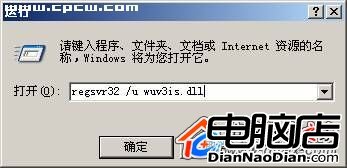
解決:「執行」輸入 regsvr32 /u wuv3is.dll 解除註冊 → 刪除 C:\Program Files\Windows Update\wuv3is.dll → 重新執行 Update(系統會自動重新產生該檔)。