WebWork(現 Struts 2 前身)以 OGNL 強大的資料綁定聞名,2.1.5 版起內建 FileUploadInterceptor,讓 Action 直接接收 java.io.File 物件,無需手動處理 request.getParameter 或 DTO,極大簡化檔案上傳開發。
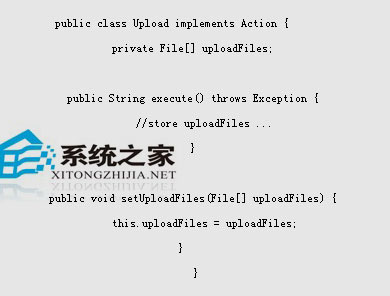
private File myFile;
private String myFileFileName; // 原始檔名
private String myFileContentType; // MIME 類型

public void setMyFile(File file) { this.myFile = file; }
public void setMyFileFileName(String name) { this.myFileFileName = name; }
public void setMyFileContentType(String type) { this.myFileContentType = type; }

public String execute() {
    // 直接操作 myFile 物件:複製、解析、存入資料庫等
    return SUCCESS;
}
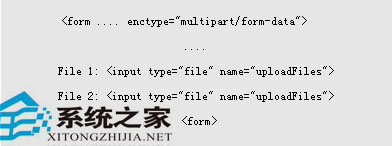
enctype="multipart/form-data" 與欄位名稱對應)<form action="upload.action" method="post" enctype="multipart/form-data">
<input type="file" name="myFile" />
<input type="submit" value="上傳" />
</form>
<interceptor-stack name="fileUploadStack">
    <interceptor-ref name="fileUpload"/>
    <interceptor-ref name="basicStack"/>
</interceptor-stack>

<action name="upload" class="com.example.UploadAction">
    <interceptor-ref name="fileUploadStack"/>
    <result name="success">/success.jsp</result>
</action>
maximumSize:限制上傳大小(預設 2MB),可在 webwork.properties 覆蓋。allowedTypes:限制 MIME 類型。List<File> 與對應的 List<String> 檔名/類型屬性。採用慣例優於配置原則,WebWork 讓檔案上傳變得像處理一般表單欄位一樣簡潔。