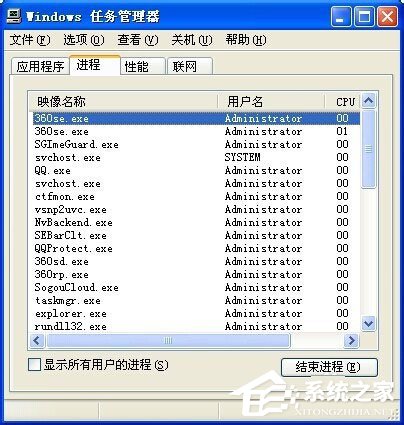
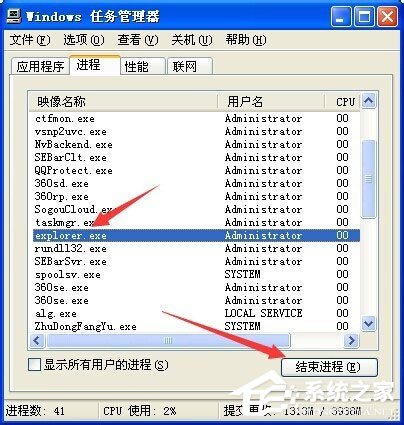
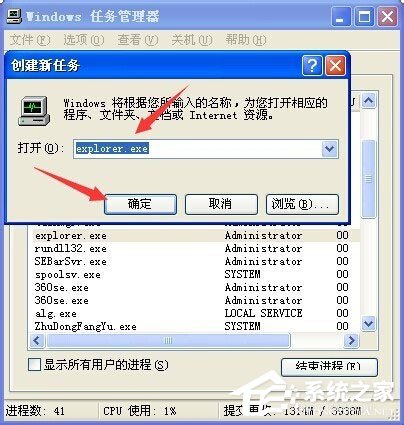
部分 WinXP 使用者回報:開機後桌面完全空白,連「開始」選單、工作列都不見了,重開機也無效。這通常是 explorer.exe(Windows 檔案總管)進程異常終止導致。以下透過工作管理員重新啟動 explorer.exe 即可快速恢復。
explorer.exe
此法適用於因 explorer.exe 掛掉導致的桌面消失問題,操作簡單且無需重開機。
深入 Windows XP 磁碟重組:Prefetch 目錄運作與關閉自動重組
WinXP安裝驅動提示「未通過Windows徽標測試」解決方案
WinXP磁碟重組完整指南:原理、內建工具與第三方軟體推薦
記事本神技:ftype 指令劫持 .exe 關聯,繞過病毒封鎖啟動命令提示字元手動清毒
Windows XP IE 提示「此索引標籤已經復原」?Internet 選項重設瀏覽器設定徹底解決
正確刪除 Windows XP 管理員帳戶:避免 Documents and Settings 殘留資料夾
WinXP快速修改檔案開啟方式的圖文教程
CCH 搬遷稅務軟體上 Windows Azure:雲端彈性與成本優化實戰