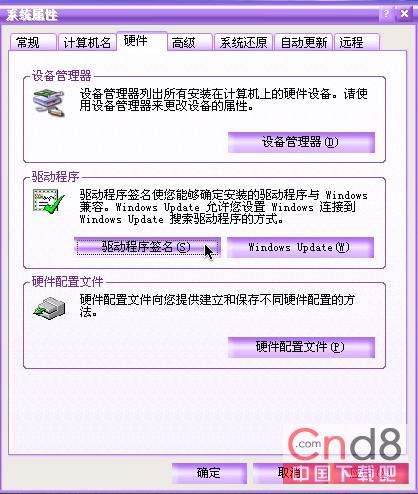
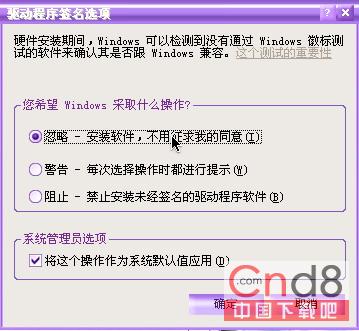
適用於 Windows 2000/XP,解決頻繁安裝測試版/第三方驅動的煩擾。
Windows XP 開機常見進程辨識與木馬偵測指南
「我的文件」不只是存檔資料夾:路徑遷移、迷你總管、自製螢幕保護三大隱藏功能
網絡安全十大威脅全防範(上):隱私洩露、弱密碼、釣魚攻擊
Windows XP 防入侵實戰指南(三):資料夾稽核追蹤非法存取操作
三大主流 RAW 格式圖片轉換工具橫評:美圖看看、Stepok RAW Imager、Adobe DNG Converter
XP 刪除使用者帳號導致 EFS 加密檔案無法開啟?教你奪回存取權
隨身碟圖示自訂全攻略:從換圖示到防刪除、防病毒一鍵搞定
系統使用與軟體配置經驗談(二):捷徑分類、輸入裝置、資源管理器、開機自啟動