Google 推出 IPv6 測試頁面,Vista 預設支援可直接訪問,XP 雖內建 IPv6 協定但預設未安裝。手動安裝步驟:
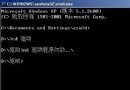
cmd
ipv6 install
Installing...Succeeded.
ipconfig /all
ipv6 uninstall
ipv6.google.com
簡單幾步驟讓 XP 具備 IPv6 連線能力,體驗下一代網路協定。
電腦新手保護電腦 15 大金玉良言:從接線到清潔的全方位守則
自製 Windows 急救還原盤實戰 (3):修復安全模式、提取關鍵系統檔、同步更新系統分區
安裝系統出現「Can't edit boot.ini」錯誤的解決方法
XP 資料夾屬性缺少「安全性」分頁?確認 NTFS 格式並關閉簡單檔案共享
XP 關閉預設共享(C$、D$、ADMIN$)提升系統安全性
Windows XP 開機故障終極排查手冊
Windows 系統防毒實戰:多帳號隔離與「金蟬脫殼」清毒法
驗證 Windows XP SP3 效能提升真相:實測開機、檔案傳輸、應用程式三大指標