操作步驟
- IE 6 工具列點選「歷史記錄」圖示 (或 Ctrl+H)。
- 左側面板依日期分組顯示:今天、昨天、前天、上週、兩週前、三週前…
- 點選特定日期,右側列出當天造訪網站 (依字母排序)。
- 點選網站/網頁連結即可重新開啟。
調整保留天數
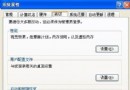
- 「工具」→「網際網路選項」→「一般」索引標籤。
- 「歷史記錄」區塊 → 「天數」輸入欲保留天數 (預設 20 天,最大 999 天)。
- 注意:天數越大,佔用磁碟空間越多。
清除歷史記錄
同一對話框 → 「清除歷史記錄」按鈕,或勾選「瀏覽器關閉時清除歷史記錄」。
進階技巧
- 歷史記錄資料儲存於
C:\Documents and Settings\使用者\Local Settings\History\History.IE5\index.dat,可用專用工具 (如 IECacheView) 匯出分析。
- 若歷史記錄異常遺失,檢查
index.dat 是否損毀,嘗試刪除該檔 (IE 關閉狀態下) 讓 IE 重建。