Windows Vista 引入全新開機架構:Windows Boot Manager (Bootmgr.exe) 取代 NTLDR,配合 Boot Configuration Data (BCD) 取代 Boot.ini,實現硬體獨立性與多系統無縫整合。管理 BCD 的命令列工具即為 BCDEdit.exe。
Windows\System32,需以系統管理員權限執行命令提示字元。{legacy}(舊版 Windows)、{default}(預設 OS)、{current}(目前分區)、{xxxxxxxx-xxxx-...}(其他 OS 分區)。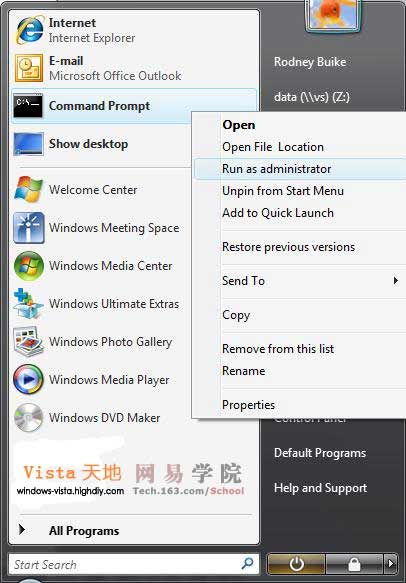
| 指令 | 說明 |
|---|---|
bcdedit /? | 顯示說明 |
bcdedit /enum all | 列出所有開機項目與 GUID |
bcdedit /export "D:\BCD Backup" | 備份 BCD 至指定路徑 |
bcdedit /import "D:\BCD Backup" | 還原備份 |
bcdedit /set {legacy} description "Windows XP Pro SP2" | 修改舊版 OS 顯示名稱 |
bcdedit /set {current} description "Windows Vista Build 5270" | 修改目前 OS 顯示名稱 |
bcdedit /default {GUID} | 設定預設開機 OS |
bcdedit /displayorder {legacy} {current} | 調整開機選單顯示順序 |
bcdedit /timeout 15 | 設定等待秒數(預設 30 秒) |
若修改導致分區結構混亂,可嘗試:
X:\boot\bootsect.exe -lh -all(X 為開機分區)bcdedit /set {GUID} device partition=X:bcdedit /set {GUID} osdevice partition=X:(需與上一指令配對)提醒:操作前務必備份 BCD,手動輸入長 GUID 易出錯導致無法開機。
恢復 Vista 桌面默認圖標(計算機/網絡/回收站/用戶文件)
EasyBCD 輕鬆修復 Vista/XP 雙開機引導問題,免敲晦澀 BCD 指令
Vista 重開機自動進入安全模式:關閉 msconfig「安全開機」選項解決
破解 Vista 升級限制:從 XP Tablet/2000/2003/Me/98 跨版本升級實戰
更改 Windows Vista 產品金鑰:圖形介面與命令列雙軌操作教學
Vista 升級 Windows 7 卡在 62% 解決方案:環境變數屏蔽 IphlpsvcMigPlugin.dll 遷移外掛