問題情境
存取網路共享資料夾時勾選「記住我的密碼」,日後想移除或變更認證卻找不到設定位置。
解決步驟
- 開啟「控制台」 → 「使用者帳戶」(或「使用者帳戶與家庭安全」→「使用者帳戶」)。
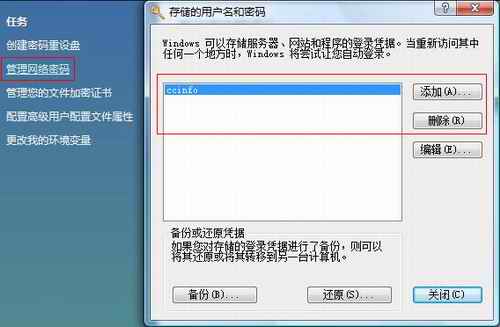
- 左側選單點選 「管理網路密碼」(Vista 稱「管理您的網路密碼」)。
- 在「已儲存的使用者名稱和密碼」視窗中,選取欲刪除的項目,點選 「移除」。
- 確認刪除,下次存取該網路資源將重新提示輸入帳號密碼。
適用版本
Windows Vista Home Premium / Business / Ultimate 等所有版本。Windows 7/8/10 路徑類似:控制台 → 認證管理員 → Windows 認證。