Vista 默認 Guest 帳戶登錄時任務欄不顯示輸入法圖標。快速恢復:
ctfmon 回車。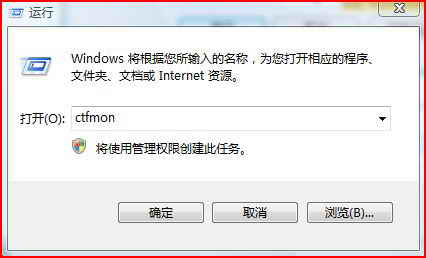
原理:手動啟動文本服務框架進程 ctfmon.exe。
Windows Vista 無法登入 QQ?權限設定一鍵解決
Vista 睡眠狀態拔除 USB 鍵盤/滑鼠導致電腦喚醒:停用裝置喚醒權限解決
非請莫入:巧用「本地安全性原則」限制多使用者登入,守護 Vista/Win7 系統純淨
Vista 預覽螢幕保護程式報錯「需要更新的顯示卡或與 Direct3D 不相容」:重裝顯卡驅動解決
解決 Vista 無法使用銳捷 (Ruijie) 客戶端上網:WinPcap + VC7 Runtime + Mento Supplicant 完整部署
Vista 下輸入法失效(紫光、拼音加加、五筆)?關鍵在 IE 保護模式與 UIPI
Vista 相容性問題不完全解決:啟動修復、壁紙插值、側邊欄天氣、啟動管理器遺失、截圖花屏、盤符錯亂、QQ 藍屏、找回執行命令