ipconfig /allcmd,右鍵選「以系統管理員身分執行」。ipconfig /all 按 Enter。
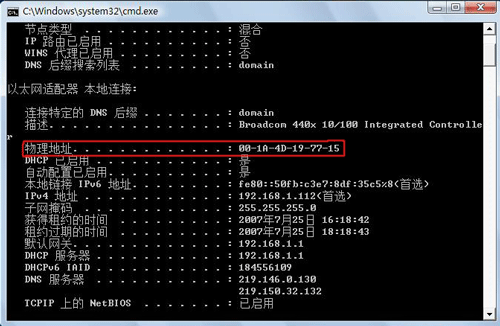
▲ ipconfig /all 顯示實體位址
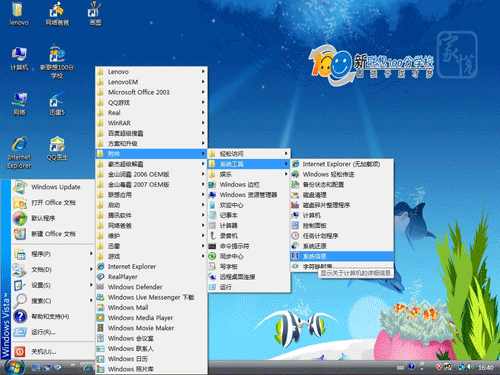
▲ 開啟系統資訊工具
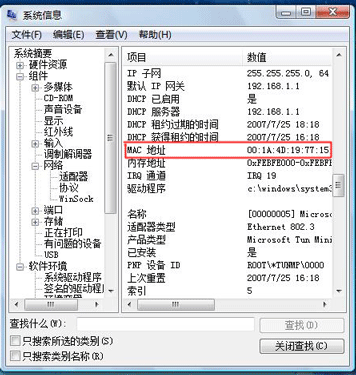
▲ 系統資訊中顯示網卡 MAC 位址
解決 Vista IE 下載自動關閉故障:安全性設定調整與重置 IE
Vista TrustedInstaller.exe 狂佔 CPU 100%?多半是 Windows Update 正在背景安裝更新
從 Vista 到 Windows 7:防火牆功能大躍進,多重網路設定檔、IPsec GUI 與 IP 範圍規則全解析
Vista 減肥誤刪驅動程式備份導致 USB 裝置無法識別?ImageX 還原驅動庫完整救援指南
Vista C 盤空間越來越小?深度剖析八大佔空間元兇與完美清理解決方案
徹底解決 Vista 安裝無法選擇/格式化硬碟分區的 8 大方法
一鍵產出 Windows Vista 系統健康報告,掌握電腦完整狀態
解決 Vista 開啟 AVI 提示「COM Surrogate 已停止運作」:重新註冊 VBScript DLL 與關閉縮圖預覽