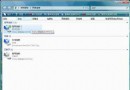
Vista UAC 阻擋一般權限寫入 C:\Windows\System32\drivers\etc\hosts,報「拒絕存取」或「無法建立檔案」。解法:
C:\Windows\System32\drivers\etc\hosts
原理:系統資料夾需提升權限寫入,UAC 攔截非提權程式寫入嘗試。
Windows Vista 快速找出正在讀寫硬碟的進程:任務管理器 I/O 欄位啟用教學
Windows Vista 32/64 位元版本功能差異與 WOW64 執行機制
在 Windows Vista 開始選單啟用隱私保護
在 Vista 開始菜單恢復「運行」命令(或用 Win+R 替代)
Windows Vista 休眠功能消失?三大原因與命令列一鍵修復
調整 Vista 開始選單「常用程式」顯示數量
窮人的 Vista 偽升級方案:用免費軟體在 XP 打造 Vista 體驗
MacBook 實現 Windows Vista Beta 2 與 macOS 雙系統啟動完整教程