Windows XP Windows 7 Windows 2003 Windows Vista Windows 綜合教學 Linux 系統教學
Windows 10 Windows 8 Windows 2008 Windows NT Windows Server 電腦軟體教學

使用 xperf 分析 Vista 開機效能瓶頸

編輯:Windows Vista 教學

Vista 開機緩慢?微軟 Windows Performance Toolkit (xperf) 可詳細收集開機階段效能數據,找出拖慢元兇。

工具取得與安裝

下載 Windows Performance Toolkit(含 xperf、xbootmgr),安裝完成後即可使用。

收集開機追蹤資料

  1. 以系統管理員身分開啟 CMD,切換至 xperf 安裝目錄。
  2. 執行:
    xbootmgr.exe -trace boot
  3. 系統會自動重啟,完成開機後自動產生 .etl 記錄檔。

分析報告

快速產出 XML 報表:

xperf -i boot_BASE+CSWITCH_1.etl -o boot.xml -a boot

深度圖形化分析:

  1. 執行 xperfview boot_BASE+CSWITCH_1.etl 開啟視覺化介面。
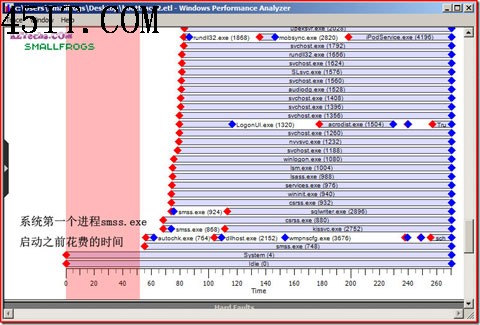
  2. 查看 Process Lifetimes 圖表,觀察核心初始化耗時、首個使用者模式進程啟動時間。
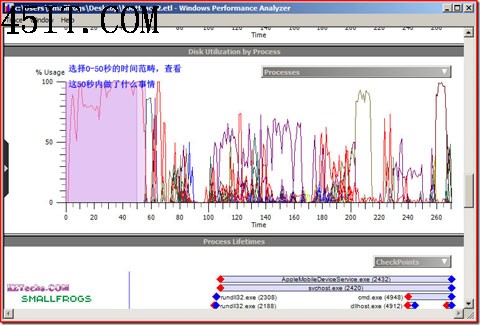
  3. 切換 Disk Utilization by process,篩選前 50 秒,找出高磁碟 I/O 進程。

透過圖表可精準定位驅動程式、服務、啟動項目等延遲原因,再針對性優化。
Copyright © Windows教程網 All Rights Reserved