Windows Vista 全新的 TCP/IP 網路協定堆疊完整支援 IPv6。想知道本機回環位址 127.0.0.1 的 IPv6 格式嗎?Vista 的 ping 指令直接告訴你。
cmd 開啟命令提示字元。ping localhost,預設回傳的封包位址為 ::1(IPv6 回環位址),而非 127.0.0.1。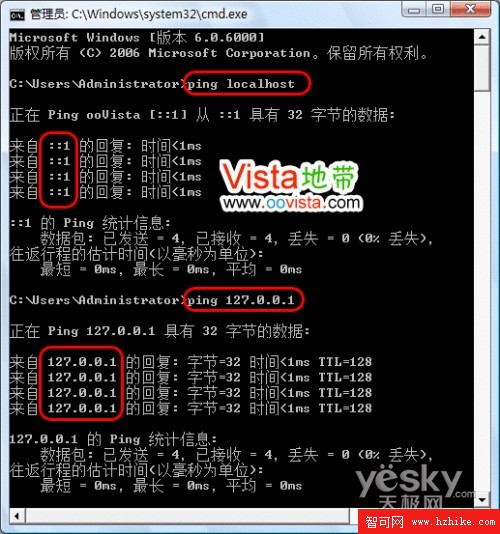
圖 1:ping localhost 回傳 IPv6 位址 ::1
開啟 C:\Windows\System32\Drivers\Etc\hosts,可見預設映射關係:
::1         localhost
127.0.0.1   localhost
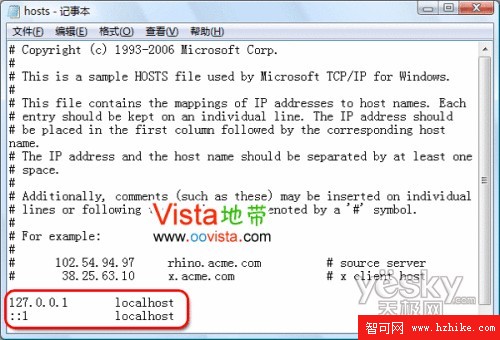
圖 2:hosts 檔案 IPv6 與 IPv4 雙重映射
C:\Users\Administrator>ping localhost
正在 Ping ooVista [::1] 從 ::1 具有 32 位元組的資料:
來自 ::1 的回覆: 時間<1ms
來自 ::1 的回覆: 時間<1ms
來自 ::1 的回覆: 時間<1ms
來自 ::1 的回覆: 時間<1ms

::1 的 Ping 統計資料:
封包: 已傳送 = 4,已接收 = 4,遺失 = 0 (0% 遺失),
往返行程估計時間(毫秒): 最短 = 0ms,最長 = 0ms,平均 = 0ms

C:\Users\Administrator>ping 127.0.0.1
正在 Ping 127.0.0.1 具有 32 位元組的資料:
來自 127.0.0.1 的回覆: 位元組=32 時間<1ms TTL=128
來自 127.0.0.1 的回覆: 位元組=32 時間<1ms TTL=128
來自 127.0.0.1 的回覆: 位元組=32 時間<1ms TTL=128
來自 127.0.0.1 的回覆: 位元組=32 時間<1ms TTL=128

127.0.0.1 的 Ping 統計資料:
封包: 已傳送 = 4,已接收 = 4,遺失 = 0 (0% 遺失),
往返行程估計時間(毫秒): 最短 = 0ms,最長 = 0ms,平均 = 0ms
補充:Vista 網路速度較 XP 慢的感覺源於 TCP/IP 連線數限制,微軟可能於未來修補程式放寬限制。Windows Server 2008 已比 Server 2003 快 44 倍,Vista 未來可期。