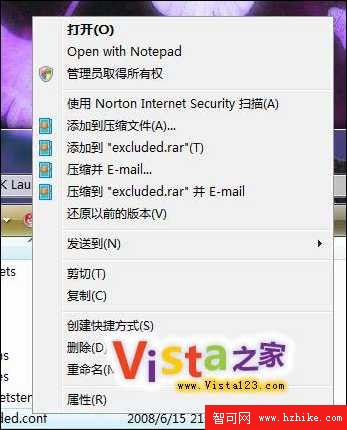
Vista 雙擊未關聯檔案(如 .conf)會彈出「開啟方式」對話框,需多步驟選擇記事本。修改登錄可在右鍵選單直接顯示「用記事本開啟」。
.conf
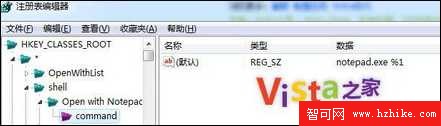
regedit
HKEY_CLASSES_ROOT\*\shell
*
shell
Open with Notepad
command
(預設)
notepad.exe %1
完成後,對任意檔案右鍵即可見「用記事本開啟」,一鍵查看內容無需繁瑣選擇。
解除 Vista/Win7 TCP/IP 半開連接限制:修改註冊表釋放下載與瀏覽頻寬
Windows Vista 內建磁碟管理輕鬆調整硬碟分區
一招提升 Vista 下隨身碟效能:啟用「高階寫入快取」優化小檔案傳輸
SATA 序列埠硬碟安裝 Vista 驅動程式實戰紀錄
Vista 核心系統進程完整解析:從 smss.exe 到 msiexec.exe
Vista 公用資料夾操作完全指南:共享、隱藏與徹底移除連結
Vista 通知區域殘留圖示一鍵清理:登錄檔刪除 IconStreams 與 PastIconsStream
修改 Vista/Win 7 遠端桌面連接埠提升安全性