Windows XP Windows 7 Windows 2003 Windows Vista Windows 綜合教學 Linux 系統教學
Windows 10 Windows 8 Windows 2008 Windows NT Windows Server 電腦軟體教學
您现在的位置: Windows教程網 >> Windows教程 >  >> Windows Server 系統教學 >> Server 2003

將 IBM ServeRAID 8i 卡驅動整合至 Windows Server 2003 安裝光碟 (x366 等機型)

編輯:Server 2003

針對 IBM x366 等搭載 ServeRAID 8i 卡的伺服器,將驅動整合進 Windows Server 2003 安裝光碟,實現安裝過程自動識別 RAID 陣列,無需軟碟機載入驅動。六大步驟完整流程。

前置準備

  • 💿 Windows Server 2003 安裝光碟映像
  • 📦 (可選) 最新 Service Pack 整合包
  • 💾 ServeRAID 8i 驅動程式 (從 IBM 支援網站下載)
  • 🔥 具備燒錄功能的電腦與空白光碟
  • 🛠️ 熟悉啟動光碟製作工具 (UltraISO、WinISO、ISO Commander 等)

六大步驟

第一步:建立工作目錄並複製安裝檔

  1. 建立目錄 mydir。
  2. 將 Windows 2003 安裝光碟完整複製到 mydir。
  3. 下載 ServeRAID 8i 驅動與相關檔案至本地。

第二步:複製驅動至 $OEM$ 目錄結構

  1. 在 mydir 下建立 $OEM$\$1\drivers\sata 目錄。
  2. 將驅動檔案 (含 arcsas.sys、arcsas.inf、.cat 等) 複製到 sata 目錄。
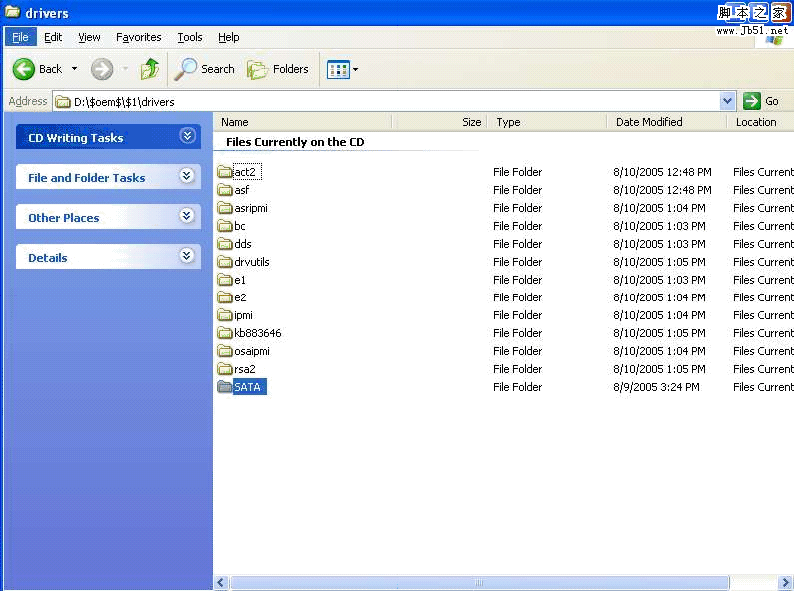
    驅動目錄結構

第三步:更新 winnt.sif (無人值守安裝檔)

  1. 使用 Windows Setup Manager Utility (Deploy.cab 中) 建立 unattend.txt → 重命名為 winnt.sif 複製到 i386 目錄。
  2. 在 [Unattended] 區段設定:
    OemPreinstall=Yes
    OemPnPDriversPath=drivers\sata (多路徑用分號分隔)
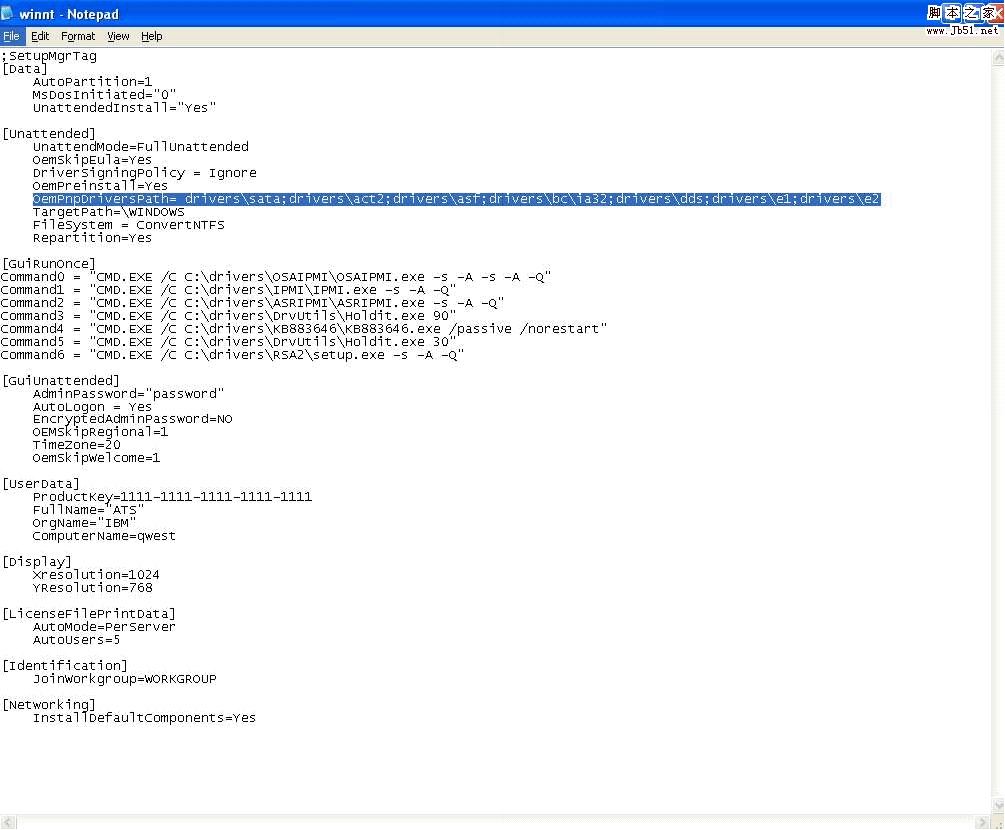
    winnt.sif 設定

第四步:編輯 txtsetup.sif (安裝階段驅動載入資訊)

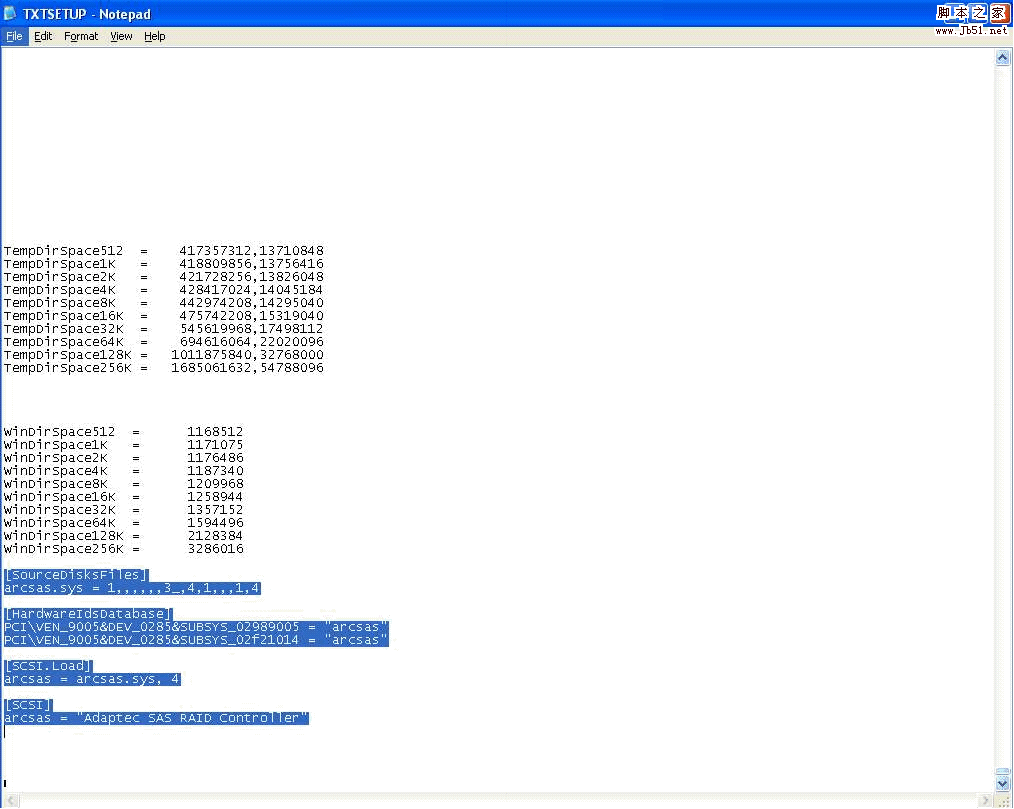
  1. 開啟 i386\txtsetup.sif,在 [SourceDisksFiles] 區段末尾添加:
    arcsas.sys = 1,,,,,,3_,4,1,,,1,4
  2. 在 [HardwareIdsDatabase] 添加硬體 ID 對應:
    PCI\VEN_9005&DEV_0285&SUBSYS_02989005 = "arcsas"
    PCI\VEN_9005&DEV_0285&SUBSYS_02f21014 = "arcsas"
  3. 在 [SCSI.Load] 添加:
    arcsas = arcsas.sys,4
  4. 在 [SCSI] 添加:
    arcsas = "Adaptec SAS RAID Controller"
    txtsetup.sif 編輯
  5. 註:硬體 ID、驅動檔名、描述字串需從驅動 .inf/.oem 檔案獲取。

第五步:壓縮驅動 .sys 檔至 i386 目錄

  1. 命令列執行:
    makecab mydir\$oem$\$1\drivers\sata\arcsas.sys mydir\i386\arcsas.sy_
  2. 生成 arcsas.sy_ 於 i386 目錄,供安裝階段解壓載入。

第六步:製作啟動光碟映像並燒錄

  1. 仔細檢查 winnt.sif、txtsetup.sif、OemPnPDriversPath 設定無誤。
  2. 使用燒錄軟體 (UltraISO 等) 以 mydir 為來源建立可啟動 ISO → 燒錄光碟。

驗證與後續

  • ✅ 使用新光碟在目標伺服器 (x366/ServeRAID 8i) 全新安裝 Windows Server 2003。
  • ✅ 安裝過程自動識別 RAID 陣列,無需按 F6、無需軟碟機。
  • 🔧 同樣流程適用於其他 IBM 伺服器搭載 ServeRAID 8i 卡機型。
Copyright © Windows教程網 All Rights Reserved