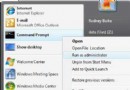
shutdown 是 Windows 內建關機指令,善用可完成定時/延遲關機、重啟、註銷等任務,無需第三方軟體。Win7 需管理員權限執行。
| 參數 | 功能 |
|---|---|
| /a | 取消關機 |
| /s | 關機 |
| /f | 強制關閉應用程式 |
| /i | 顯示圖形化介面(必須為第一參數) |
| /l | 註銷目前用戶 |
| /r | 關機並重啟 |
| /t 秒數 | 設定關機倒數計時 |
at 23:25 shutdown /s
# at 23:25 排程執行,shutdown /s 正常關機shutdown /s /t 3600
# /t 為延遲參數,3600 秒後關機善用 at 排程與 shutdown /t 延遲,靈活掌控電腦開關機時程。