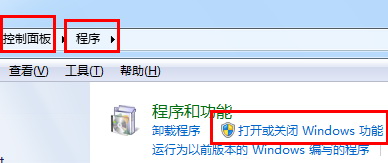
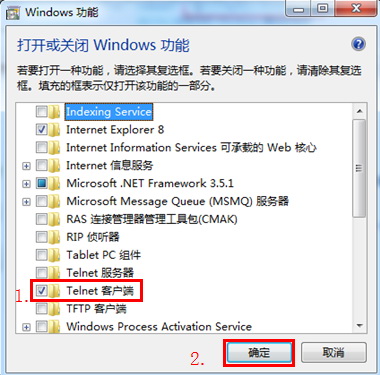
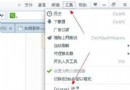
Windows 安裝完成後並未預載所有選用元件(如 IIS、Hyper-V、舊版 .NET Framework 等),需手動啟用。操作如下:
同理,若要移除已安裝元件,只要取消勾選並確定即可。
Unity Web Player 用戶統計:Windows XP 使用率再次超越 Win 7,中國用戶貢獻最大
SSH 學習筆記之一:OpenSSH 基礎安裝、金鑰機制與遠端登入實戰
惡意軟體入侵四大鐵證:首頁被改、瀏覽器上不了網、效能暴跌、詭異彈窗,早發現早清除
BIOS 設定光碟機為第一啟動裝置圖文教程:Award/AMI/Phoenix 通用操作
Windows 常用網路與系統管理指令速查表
VPS服務器安全加固實戰:低資源環境下的高防禦策略
誤刪 360ld.mbr 導致開機黑屏無桌面?用 XP 光碟修復 MBR 並移除 360 徹底解決
Linux 磁碟效能優化實戰:清理、碎片整理 (ext4/xfs)、I/O 排程器、SCSI/NVMe 升級、RAID、LVM、快取