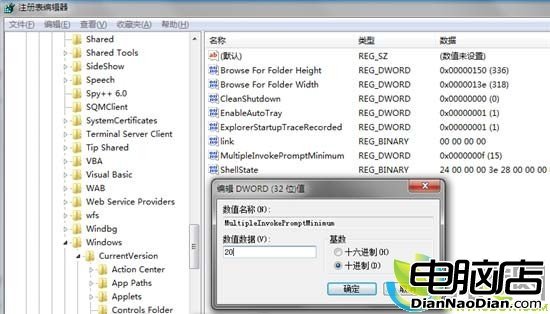
微軟 KB2022295 說明:選取 15 個以上檔案右鍵時,「開啟」、「列印」、「編輯」等項目會隱藏,非 Bug 而是為避免效能影響。需透過登錄編輯器新增 DWORD 值 MultipleInvokePromptMinimum,設定欲顯示的檔案數量上限(預設 15,十六進位 f)。值設 16 視為不限制,但實際仍受 16 檔上限限制,微軟建議勿設過大避免效能下降。登出重登或重啟 Explorer 生效。
網絡人遠程控制軟體全面升級:安全性能躍升新高度
Win 7 三大隱藏實用功能:ClearType 調校、問題步驟記錄器、工作列任意移動
微軟確認:所有現有 WP8 設備技術上均可升級 WP8.1
Win10 Build 9860 搜索欄卡頓根因與解決:關閉 Bing 聯機搜索恢復絲滑體驗
微軟反盜版瞄準16經銷商 不排除法律訴訟
微軟更新內置應用「Windows相機」與「錄音機」:小幅優化與介面調整
Win10 新安全特性將成強制升級理由:身份識別系統、容器化保護、企業數據防洩
「Kinect 之父」領軍研發 Windows 穿戴裝置:智慧手表、眼鏡、Kinect Glasses