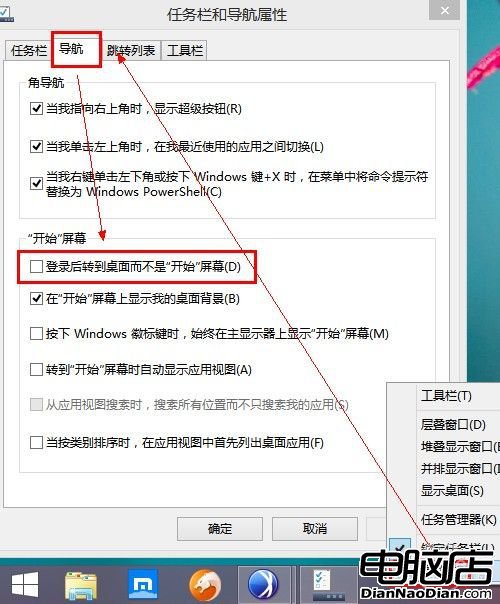
不習慣開機進入「開始」畫面?Windows 8.1 可設定像 Win7 一樣直接進入傳統桌面。方法:在桌面模式下,任務列空白處右鍵→屬性→導航標籤→「開始畫面」區塊,勾選「登入後進入桌面而非『開始』畫面」。雖然步驟簡單,但選項隱藏較深,期待正式版優化設定路徑。
設定位置截圖
Windows 10 企業版新增「裝置防護」功能,硬體級隔離惡意軟體
Windows 10 消費者預覽版我們期待的功能清單
微軟用戶關於嵌入式 Windows 的總結
分析師:Windows 8 應用生態嚴重不足 短期難與 iOS、Android 抗衡
Win10 系統中發現 Win8.1 Update 2 蹤跡:微軟內部確存、原計劃引入開始菜單、後推遲至 Win10、嘗試延長 Win8 生命週期
Windows 10 預覽版 / WP10 預覽版下載:1 月 21 日發布會後不久推送
Win8.1 Update 專題:工作列整合 Modern 應用——固定、預覽、多標籤、工具列、跳躍清單完整支援
WP8 Unity 開發者整合推播通知教程:App42 API 範例步驟