Windows XP Windows 7 Windows 2003 Windows Vista Windows 綜合教學 Linux 系統教學
Windows 10 Windows 8 Windows 2008 Windows NT Windows Server 電腦軟體教學
您现在的位置: Windows教程網 >> Windows教程 >  >> Windows 綜合教學 >> 關於 Windows

移除 Windows 登入/鎖定畫面電源按鈕:本地群組原則一鍵禁用

編輯:關於 Windows

Windows 登入畫面與鎖定畫面(Win+L)預設顯示電源按鈕,允許未登入使用者直接關機或重啟,存在誤操作風險。透過本地群組原則可移除該按鈕,適用於 Windows 7/8/8.1/10 專業版與企業版。

設定步驟

  1. 按 Win+R 輸入 gpedit.msc 開啟本地群組原則編輯器
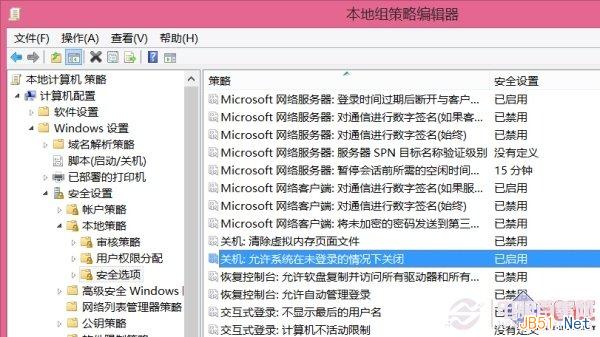
  2. 依序展開:電腦設定 → Windows 設定 → 安全性設定 → 本地原則 → 安全性選項
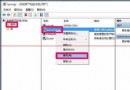
  3. 尋找「關機:允許系統在未登入的情況下關閉」
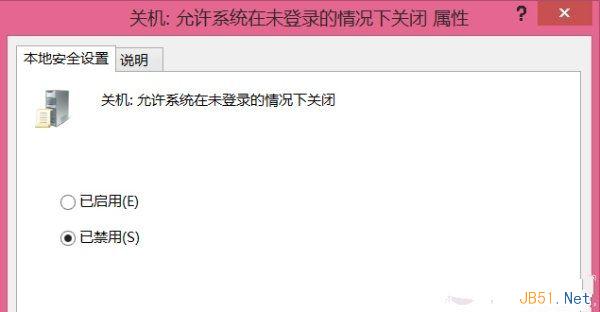
  4. 雙擊該項目,選擇「已停用」,點選「確定」
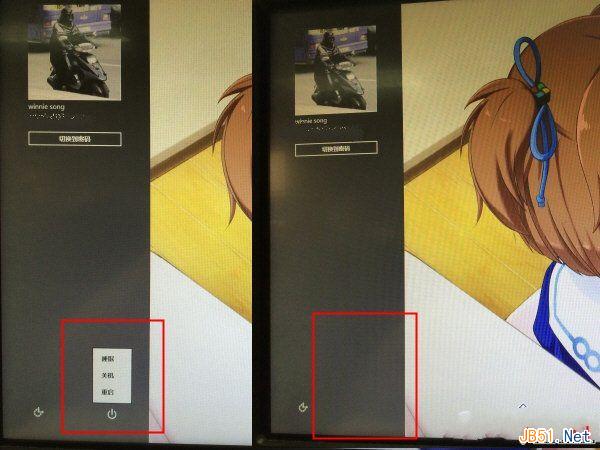
  5. 按 Win+L 鎖定電腦驗證,電源按鈕已消失

尋找群組原則項目 設為已停用 鎖定畫面對比

注意事項

  • 家用版無 gpedit.msc,需透過註冊表修改:HKEY_LOCAL_MACHINE\SOFTWARE\Microsoft\Windows\CurrentVersion\Policies\System 新增 DWORD shutdownwithoutlogon = 0

  • 此設定不影響實體電源鍵、長按關機或斷電操作
  • 需恢復時將原則改回「已啟用」或「未設定」
Copyright © Windows教程網 All Rights Reserved