Win7 32 位元「電腦」視窗硬碟圖示異常、非系統分區無磁碟標籤,優先嘗試清空圖示快取重開機;無效則刪除分區根目錄下的 autorun.inf。
autorun.inf
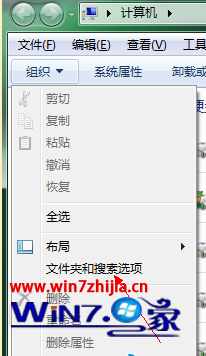
圖 1:資料夾選項顯示隱藏/系統檔案
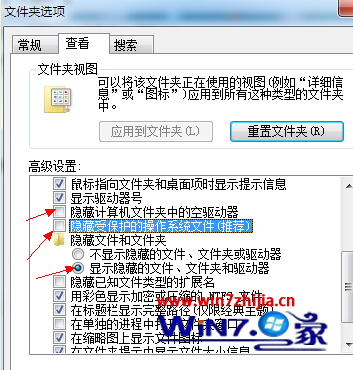
圖 2:檢視分頁詳細設定
若仍異常,檢查硬碟健康度(S.M.A.R.T.)、掃描病毒、重建圖示快取(ie4uinit.exe -show 或刪除 %LocalAppData%\IconCache.db 重開機)。
ie4uinit.exe -show
%LocalAppData%\IconCache.db
微軟調整「補丁星期二」預告機制:ANS 服務不再公開,僅提供給企業與高階用戶
Win8 快速關機:建立一鍵關機捷徑教學
Windows 10 台式機無法辨識硬碟?五大故障徵兆與原因分析
Windows 10 預覽版下載與 USB 開機隨身碟製作完整指南:官方 ISO、產品金鑰、VirtualBox 安裝
Windows Server 2008 部署 IIS、FTP、Oracle 服務筆記
Win10 檔案總管當機不回應?一招快速重新啟動資源管理器
Win10 10532 預覽版自製中文 ISO 映像檔下載 (32位元/64位元)
Win10 移除右鍵選單「Radeon 設定」選項 (AMD 顯卡)