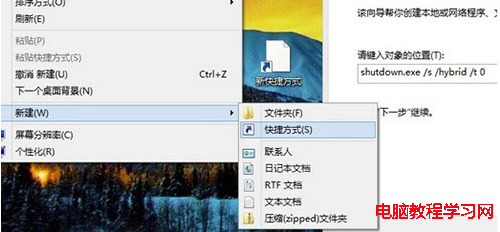
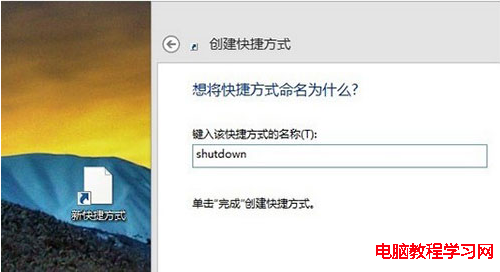
Windows 8 移除傳統開始選單,關機入口隱藏較深。建立桌面捷徑可實現一鍵關機。
shutdown.exe /s /hybrid /t 0
/s
/hybrid
/t 0
點擊此捷徑即可立即關機。同理可建立重新啟動捷徑:shutdown.exe /r /t 0。
shutdown.exe /r /t 0
Windows 10 以系統管理員身分開啟命令提示字元三大法:Win+X+A、Win+X 選單、開始選單搜尋
Win10 Mobile 10149 安裝無反應?電量未滿 40% 為主因,充電即解
Win10 Edge 瀏覽器頻繁閃退?重設預設瀏覽器或重註冊 App 包解決
Win7多任务切换快捷键大全:Alt+Tab/Win+Tab/3D Flip实用技巧
Win7 以系統管理員身分執行命令提示字元:開始選單右鍵、快速鍵兩法
Win7 寬帶撥號上網完整圖文教學:PPPoE 連線設定步驟詳解
Win7 Sysprep 重置系統教學(含啟用內建 Administrator)
Windows 7 環境變數新增與修改完整圖文教學