Win7 64 位元播放 SWF (Flash 動畫) 提示錯誤,透過群組原則啟用 IE「本機電腦區域鎖定安全性」下的「所有處理序」即可解決。
gpedit.msc
圖 1:執行 gpedit.msc
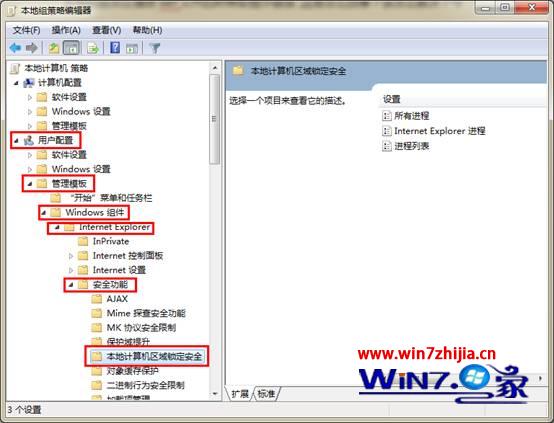
圖 2:定位至本機電腦區域鎖定安全性
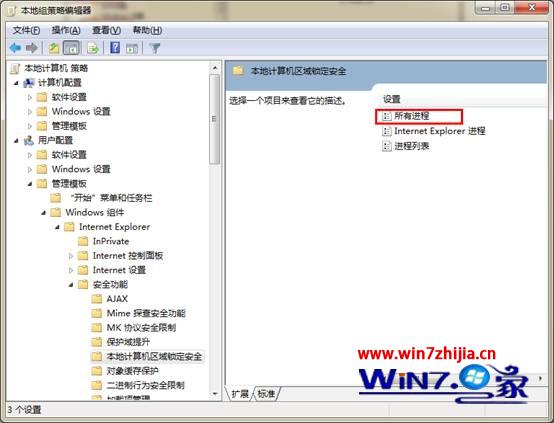
圖 3:雙擊所有處理序
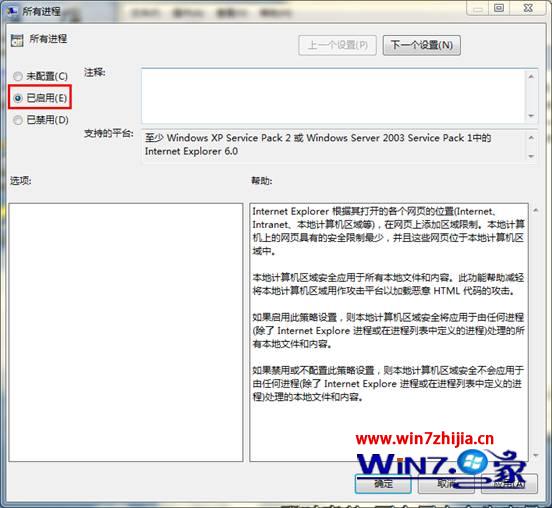
圖 4:設為已啟用並確定
設定完成後重新開機或重啟 IE,即可正常播放 SWF 檔案。
Win7 將「執行」指令加入開始選單右側欄:圖文教學
一張圖看懂微軟從 Win8 到 Win10 的設計語言大轉變
Win10 Mobile 10149 簡易上手視頻:Edge、Cortana、相簿、OneDrive 全面更新
Windows 10 專業版隱藏/顯示資料夾完整教學:兩步驟輕鬆保護隱私
Windows 7 開啟 IE 瀏覽器自動彈出兩個首頁?兩種情況解決方案
回顧 30 年:Windows 系統演進一覽(含 Win10)
Windows 10 安裝 CAXA 2016 電子圖板完整圖文教學(含破解補丁)
Win10 系統需求規格:1GHz 處理器、1GB/2GB 記憶體、16GB/20GB 硬碟空間、DirectX 9 顯卡