Windows XP Windows 7 Windows 2003 Windows Vista Windows 綜合教學 Linux 系統教學
Windows 10 Windows 8 Windows 2008 Windows NT Windows Server 電腦軟體教學
您现在的位置: Windows教程網 >> Windows教程 >  >> Windows 綜合教學 >> 關於 Windows

Windows 7 「電腦」右鍵「管理」打不開/程式未關聯錯誤修復:登錄補回 IsShortcut 鍵值或修正 CompMgmtLauncher.exe 呼叫路徑

編輯:關於 Windows

Windows 7 「電腦」右鍵「管理」無法開啟,提示「程式未關聯」,主因兩種:

  1. 誤刪登錄 IsShortcut 鍵值 (常因優化軟體導致)。
  2. CompMgmtLauncher.exe 呼叫失效 (不相容程式導致)。

修復方案一:補回 IsShortcut 鍵值 (最常見)

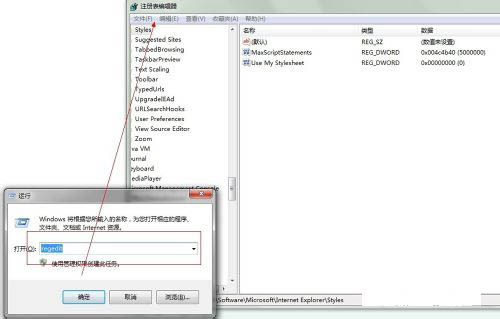
  1. Win + R → regedit。
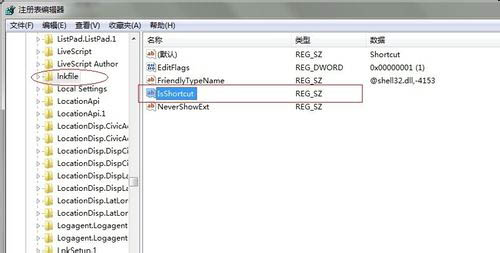
  2. 定位 HKEY_CLASSES_ROOT\lnkfile,右側若無 IsShortcut 字串值 → 右鍵新增字串值命名 IsShortcut (數值留空)。
  3. 同樣處理 HKEY_CLASSES_ROOT\piffile。
  4. 關閉登錄編輯器 → 登出/重新登入生效。注意:快捷方式小箭頭將同時恢復。

修復方案二:修正管理單元呼叫路徑

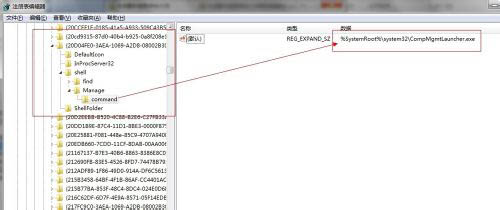
  1. 登錄定位 HKEY_LOCAL_MACHINE\SOFTWARE\Classes\CLSID\{20D04FE0-3AEA-1069-A2D8-08002B30309D}\shell\Manage\command。
  2. 修改右側「預設」字串值為:mmc.exe %windir%\system32\compmgmt.msc。
  3. 關閉登錄編輯器,「管理」即可正常開啟 (直接呼叫 compmgmt.msc 繞過 CompMgmtLauncher.exe)。

警示:多數案例為優化軟體誤刪 IsShortcut 導致。建議減少使用優化軟體,或使用前確認其修改內容與可逆性,以免破壞系統功能換取虛假「優化」。

Copyright © Windows教程網 All Rights Reserved