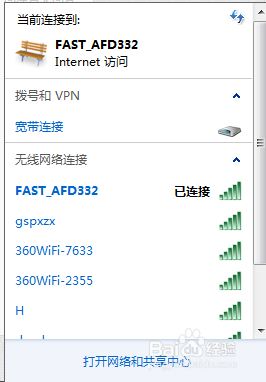
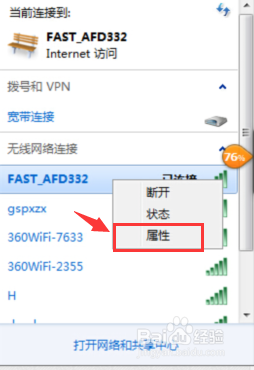
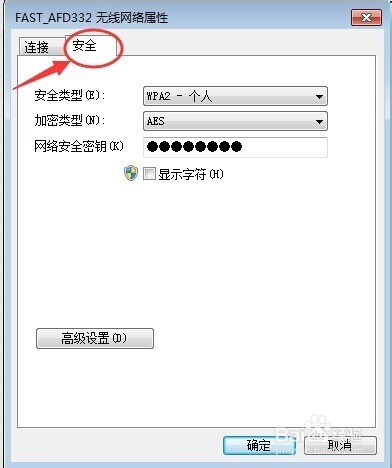
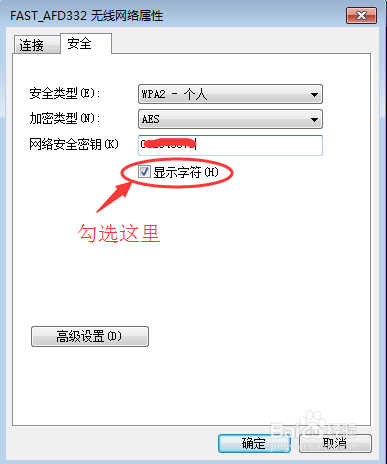
長期自動連線的 WiFi 密碼容易遺忘。Windows 7 內建功能可直接查看目前已連線網路的明文密碼,無需第三方工具。
Windows 10 週年更新 14393.67 或為最後一個預覽版推送
IIS 7.5 (Windows Server 2008 R2) 架設 FTP 7.5 並使用 IIS 管理員憑證驗證完整教學
U 盤安裝 Win10 周年更新正式版完整圖文教程:軟媒魔方製作啟動盤、BIOS 設定、分區安裝全流程
Windows 10 官方中文頁面上線 確認免費升級政策與企業版例外
Win7 蓝屏 Win32k.sys 错误排查:安全模式验证 → 干净启动定位第三方冲突 → 回溯近期变更 → sfc/scannow 修复系统文件
Win10 Mobile 10136 無線列印功能實測:支援 PCLm/PWG Raster/Open XPS/MS XPS,免驅動支援 1900+ 印表機