誤勾選「總是關閉所有分頁」導致 IE 關閉多個分頁不再提示。重新啟用警告訊息:
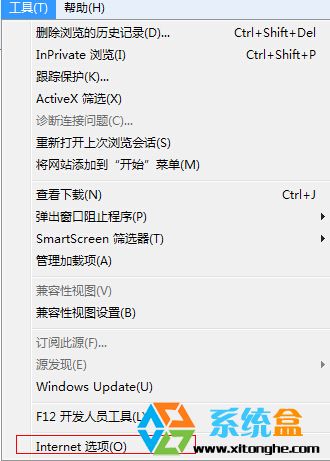
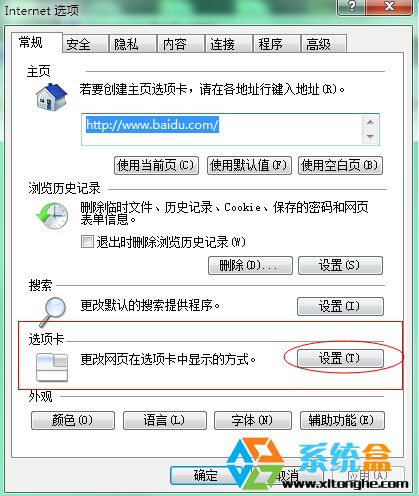
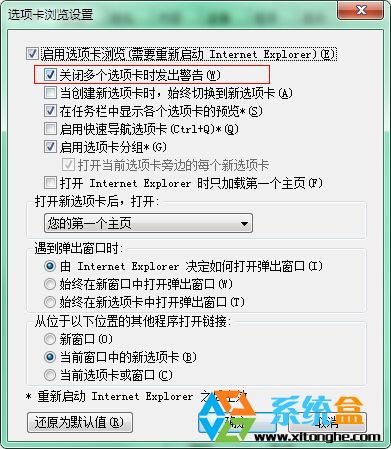
設定後關閉含多個分頁的 IE 視窗將彈出確認對話框,有效防止誤關閉重要網頁。
Win8.1 解除安裝程式後控制台殘留項目無法刪除?登錄編輯器徹底清除
Win10 正式版如何取得完美管理員權限刪除 Windows.old?註冊表新增右鍵選單法
XP 執行 EXE 提示「不是有效的 Win32 應用程式」怎麼辦?兩大修復方案
Windows Server 2016 TP3 RC Build 10514 大量截圖與下載連結曝光,微軟下週將正式發布
Windows 10 自動更新如何管理?關閉/延遲/掌控更新完整策略指南
Win7/8 修改本地連線 DNS 完整圖文教學 (適用固定 IP 環境)
Windows 開關機音樂與提示音自訂:控制台「聲音」頁籤替換 WAV 檔案完整教學
Win8 提示「無效的產品金鑰」錯誤碼 0x80070424?匯入登錄檔重建 Software Protection 服務修復授權