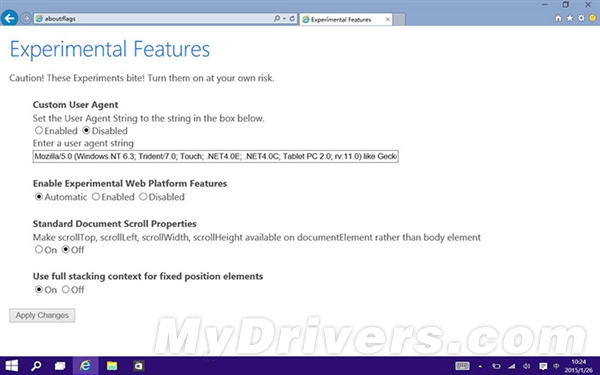
Build 9926 雖未內建獨立 Spartan 瀏覽器,但 IE11 已整合 Edge 渲染引擎。啟用方法:
about:flags
同頁面亦可自訂 User Agent 字串偽裝成 Firefox/Chrome。此為開發者實驗功能,極不穩定,且僅限 Build 9926 有效。
Win10 開始選單打不開?重新啟動 User Manager 服務解決
Win7 開啟檔案與印表機共用,區域網路輕鬆列印
Win10 藍屏代碼 win32kfull.sys?重啟/玩遊戲兩種場景精準修復指南
Win10 群組原則開啟報「命名空間已被定義」錯誤?刪除 Geolocation WLPAdm.admx 徹底解決
Win10 Microsoft 帳戶密碼忘記怎麼辦?透過 Microsoft 線上重設密碼系統恢復存取,無法本地破解
DirectX 12 不支援 Win7/8!玩家需購買新顯卡才能發揮性能
Win8.1 玩大型遊戲卡頓不流暢?更新顯卡驅動一鍵解決
Win8.1桌面「家庭組」圖標反復出現?兩種方案徹底清除:退出家庭組vs禁用服務