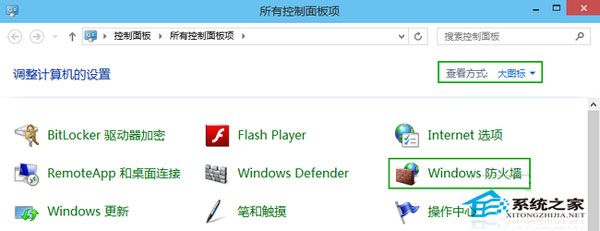
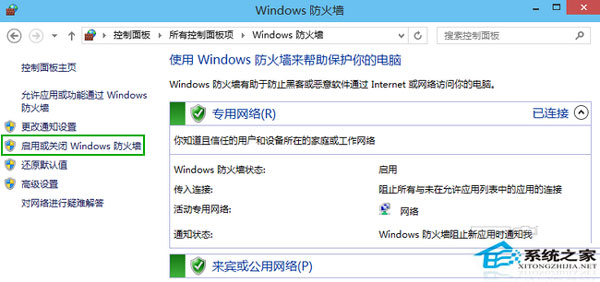
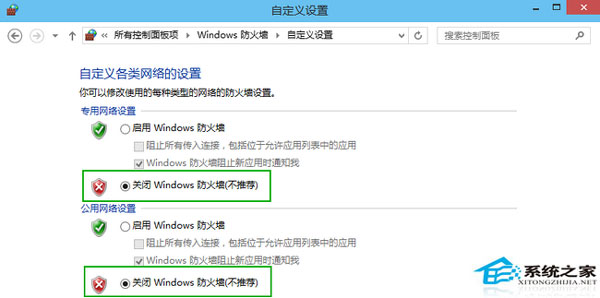
# 關閉所有設定檔防火牆 (需系統管理員權限)
netsh advfirewall set allprofiles state off

# 關閉特定設定檔
netsh advfirewall set domainprofile state off
netsh advfirewall set privateprofile state off
netsh advfirewall set publicprofile state off

# 查詢狀態
netsh advfirewall show allprofiles
# 允許特定程式輸出連線
netsh advfirewall firewall add rule name="Allow MyApp" dir=out action=allow program="C:\Path\MyApp.exe" enable=yes

# 允許特定埠入站 (如遠端桌面 3389)
netsh advfirewall firewall add rule name="Allow RDP" dir=in action=allow protocol=TCP localport=3389 enable=yes
精準放行比全關安全得多,建議養成「最小權限原則」管理防火牆規則。
Win10 內建紙牌遊戲全攻略:五大模式、每日挑戰、星級俱樂部與主題自訂
Win10 Insider 14986升級15002實戰記錄:多次重啟、應用重裝、新增Apps設置分類
Win7 重灌後沒聲音怎麼辦?四步排查喇叭、麥克風、驅動與服務
【影片】Build 2015 示範:Project Astoria 輕鬆移植 Android/iOS 應用至 Windows 10
Windows 10 開啟「鎖定記憶體分頁」權限完整圖文教學
Win8.1 升級 Win10 失敗報錯 800070005?卸載第三方殺毒軟件/安全工具即可解決
Win10 Spartan (Edge) 瀏覽器啟用與上手體驗:about:flags 開啟實驗性 EdgeHTML 引擎、功能詳解