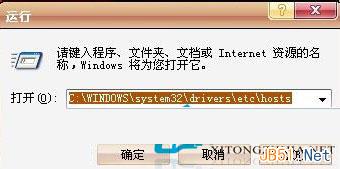
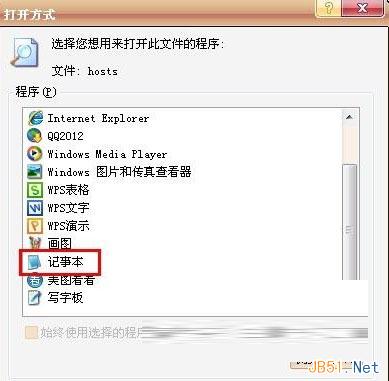
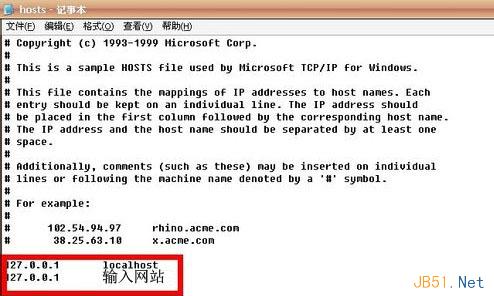
利用 hosts 檔將不良網站導向本機 (127.0.0.1) 實現封鎖,跨 XP/Win7/Win8 通用。操作:① Win+R → C:\Windows\System32\drivers\etc\hosts → 選記事本開啟;② 檔案末尾每行加 127.0.0.1 不良網域;③ Ctrl+S 存檔;④ 重開瀏覽器測試,頁面無法載入即封鎖成功。家長防沉迷、企業管網必備小技巧。
C:\Windows\System32\drivers\etc\hosts
127.0.0.1 不良網域
127.0.0.1 封鎖域名
無需第三方軟體,系統級攔截,效能零負擔,適用全 Windows 版本。
Windows XP 工作列變雙層怎麼辦?三步驟快速還原單列顯示
升級 Win10 遭遇 0xc0000017 錯誤?BCD 清除壞記憶體標記解決:bcdedit /deletevalue {badmemory} badmemorylist
Win10 IME 輸入法被禁用無法切換?批次檔一鍵啟動 TextServicesFramework/MsCtfMonitor 任務
MacBook 安裝 Win10 後觸控板沒有右鍵?Boot Camp 設定啟用「輔助點擊」解決
Win7 睡眠喚醒後拒絕存取?關閉再開啟休眠功能修復教學
XP 系統如何刪除多餘使用者帳號?兩種方法圖文教學
Win10 Build 10568 更新內容:底層修復為主,無明顯新功能,ISO 已洩露
Windows 8 IE10 閃退問題:重設預設瀏覽器或檢查安全軟體鎖定