Win10 9926 開機後點選「開始」或搜尋列,輸入法圖示變灰禁用,必須重開機才能恢復。實際上是排程工作 MsCtfMonitor 未自動執行導致。
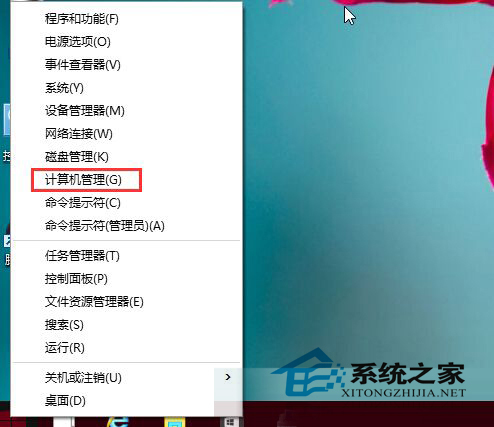
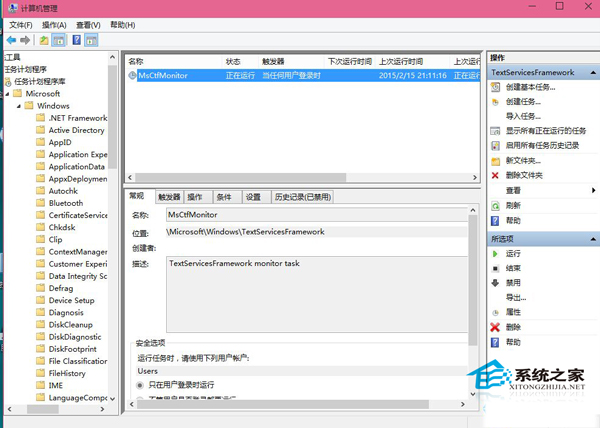
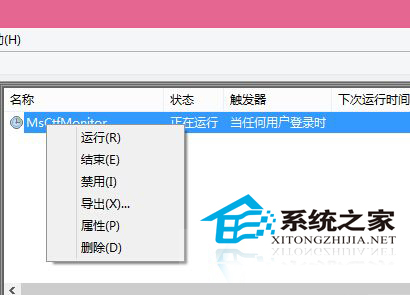
原理:MsCtfMonitor 是負責啟動輸入法指示器的排程工作。手動執行一次即可恢復輸入法功能,微軟後續更新已修正此 Bug。
Win10 Mobile 10536.1004 安裝 Android APK 暫時失效:Project Astoria 相容性問題待修復
Windows 8 刪除無效光碟機代碼教學:透過磁碟管理移除幽靈磁碟機代號
Win7 將 Chrome 擴充功能封裝匯入 360 瀏覽器完整教學
Win10 RS2 Build 14931 反饋中心更新:深色主題、作者顯示、主題跟隨系統
升級 Windows 10 後如何還原至 Windows 7/8.1:千萬別刪 Windows.old 資料夾
Win7 如何徹底移除過時印表機驅動程式?透過「列印伺服器屬性」乾淨卸載