Win10 檔案總管預設滑鼠指向資料夾會顯示大小、日期等提示資訊,若被誤關閉導致不顯示,透過「檢視」設定即可一鍵恢復。
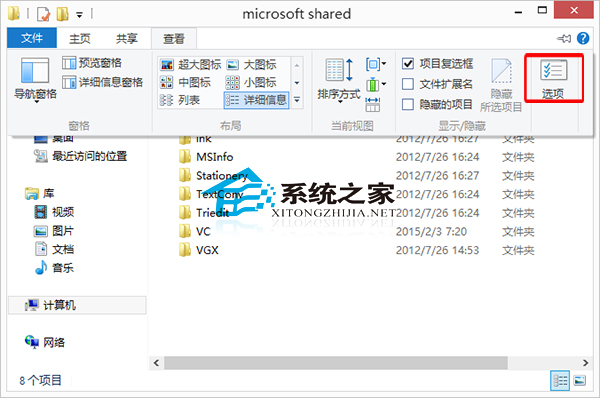
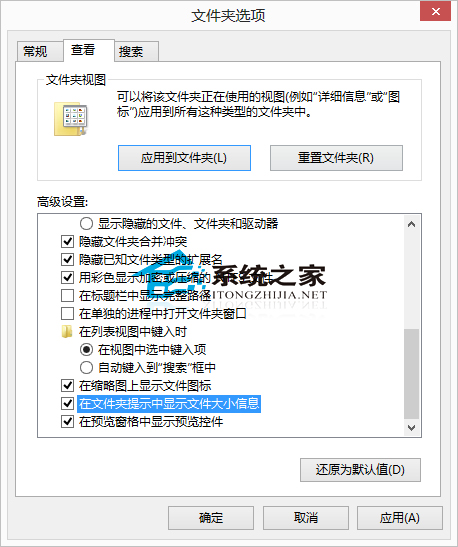
啟用後,滑鼠懸停資料夾即可即時查看大小、包含檔案數等資訊,大幅提升檔案管理效率,建議永久保持啟用。
Windows 環境變數完整表 (XP/Win7/Win8) 與實用範例:%HOMEPATH%、%TEMP%、%APPDATA% 善用加速操作
Windows 10 Mobile 週年更新 14393.67 開始推送至電信商客製機型
Win7 為資源管理器新增遠端搜尋連接器:直接在總管搜尋 Bing/Google/Yahoo
Win10 Mobile 14342 對比 14332:通知中心介面暗黑化、圖示更清晰、時間位置調整
Win10 Build 10576 執行流暢度實測:Edge 串流投影、PDF 整合小娜、Xbox Beta 更新