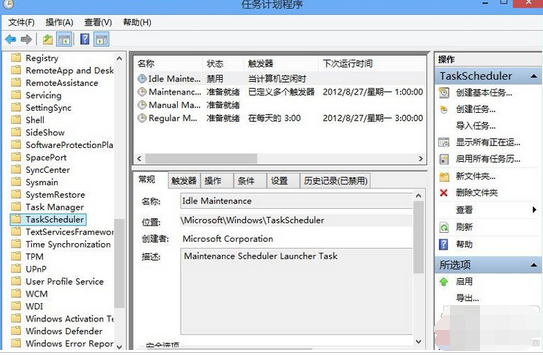
Win10 自動維護包含軟體更新、安全掃描、系統診斷,預設在閒置時每天執行。低配電腦執行時 CPU/磁碟占用高導致卡頓。關閉方法:
Microsoft\Windows\TaskScheduler
Windows 10 深色主題炫酷登場,Edge 瀏覽器夜間模式超性感
Windows Server 2008 R2 開啟 Aero 桌面主題方法
Win10 開始選單完整設定技巧大全 圖文詳解 11 項實用功能
Win10 永久啟用後如何備份啟用金鑰?重裝系統離線還原教學
史上最簡單 Win10 10041 升級 10061 教學:註冊表修改 + 服務重置 完整圖文步驟
Win7 硬碟狂閃、頻繁讀寫?停用三大服務 + 關閉系統還原/壓縮/索引保護硬碟
Win10 顯卡驅動如何回滾至上一版本?裝置管理器一鍵操作教學
Windows 10 如何徹底關閉小娜 (Cortana) 後台程序