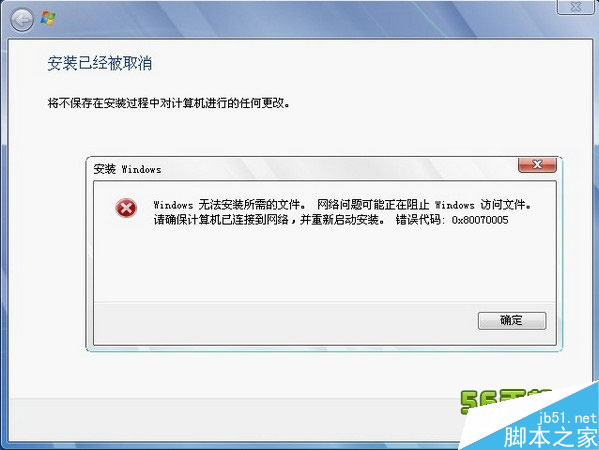
錯誤代碼 0x80070005 代表「存取被拒絕」,常見於 Windows Update 安裝失敗、應用程式無法啟動。核心成因為 權限不足 或 惡意軟體阻擋。本文提供以管理員身分執行、掃毒清除、重設元件存儲三步驟解決方案。
sfc /scannow 修復系統檔案。DISM /Online /Cleanup-Image /RestoreHealth 修復元件存儲。net stop wuauserv
net stop bits
ren %systemroot%\SoftwareDistribution SoftwareDistribution.old
ren %systemroot%\System32\catroot2 catroot2.old
net start wuauserv
net start bits執行後重開機,Windows Update 將重建資料庫,通常能解決持續性的 0x80070005。
Win8.1 如何關閉右側 Charms 列(超級選單)自動彈出?
Windows 10 讓 Charms 列回歸桌面:Win+C 快捷鍵或 PopCharms 工具完整教學
Windows 10 Xbox One 遊戲串流解鎖 1080P 超高畫質完整步驟:修改 IsInternalPreview 為 true,頻寬需 30Mbps
Win10 週年更新 14352 自製中文 ISO 系統映像下載(32/64 位),含 SHA1 校驗與三種激活途徑
Win10 啟用內置 Administrator 超級管理員賬戶獲取最高權限