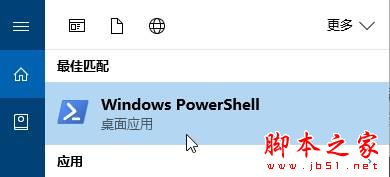
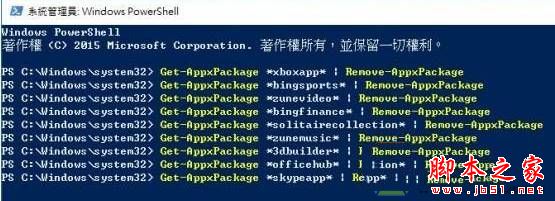
Win10 內建 UWP 應用(照片、地圖、Xbox、郵件等)在「設定 → 應用程式與功能」中卸載鈕為灰色,無法透過圖形介面移除。必須使用 PowerShell 以系統管理員身分執行 Remove-AppxPackage 指令強制卸載。
Get-AppxPackage *zunemusic* | Remove-AppxPackageGet-AppxPackage *onenote* | Remove-AppxPackageGet-AppxPackage *windowsmaps* | Remove-AppxPackageGet-AppxPackage *3dbuilder* | Remove-AppxPackageGet-AppxPackage *windowsalarms* | Remove-AppxPackageGet-AppxPackage *bingweather* | Remove-AppxPackageGet-AppxPackage *xboxapp* | Remove-AppxPackageGet-AppxPackage *windowscalculator* | Remove-AppxPackageGet-AppxPackage *windowscommunicationsapps* | Remove-AppxPackageGet-AppxPackage *windowscamera* | Remove-AppxPackageGet-AppxPackage *officehub* | Remove-AppxPackageGet-AppxPackage *skypeapp* | Remove-AppxPackageGet-AppxPackage *getstarted* | Remove-AppxPackageGet-AppxPackage *solitairecollection* | Remove-AppxPackageGet-AppxPackage *bingfinance* | Remove-AppxPackageGet-AppxPackage *zunevideo* | Remove-AppxPackageGet-AppxPackage *bingnews* | Remove-AppxPackageGet-AppxPackage *people* | Remove-AppxPackageGet-AppxPackage *windowsphone* | Remove-AppxPackageGet-AppxPackage *photos* | Remove-AppxPackageGet-AppxPackage *windowsstore* | Remove-AppxPackageGet-AppxPackage *bingsports* | Remove-AppxPackageGet-AppxPackage *soundrecorder* | Remove-AppxPackage操作方式: 以系統管理員開啟 PowerShell → 貼上所需指令 → Enter → 完成。
一鍵重註冊所有 App(修復異常不卸載):
Get-AppXPackage -AllUsers | Foreach {Add-AppxPackage -DisableDevelopmentMode -Register "$($_.InstallLocation)\AppXManifest.xml"}