Windows XP Windows 7 Windows 2003 Windows Vista Windows 綜合教學 Linux 系統教學
Windows 10 Windows 8 Windows 2008 Windows NT Windows Server 電腦軟體教學
您现在的位置: Windows教程網 >> Windows教程 >  >> Windows 綜合教學 >> 關於 Windows

Win10 取消自動更新:登錄表 RecoveredFrom 封鎖特定版本號升級

編輯:關於 Windows

Win10 正式版同樣採用強制自動更新機制,若需暫時阻止特定版本升級,可沿用預覽版登錄表封鎖法:

  1. Win+R → regedit。
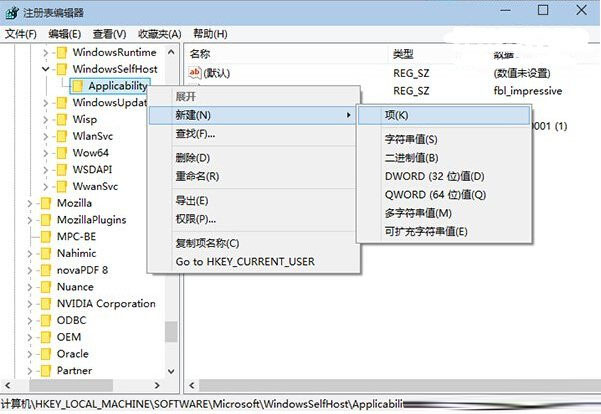
  2. 定位:HKEY_LOCAL_MACHINE\SOFTWARE\Microsoft\WindowsSelfHost\Applicability\RecoveredFrom(無則新增)。
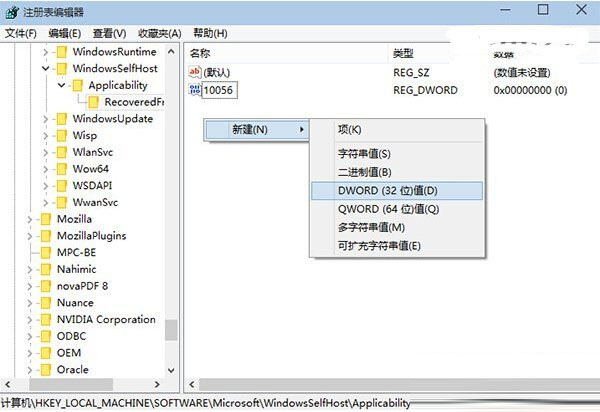
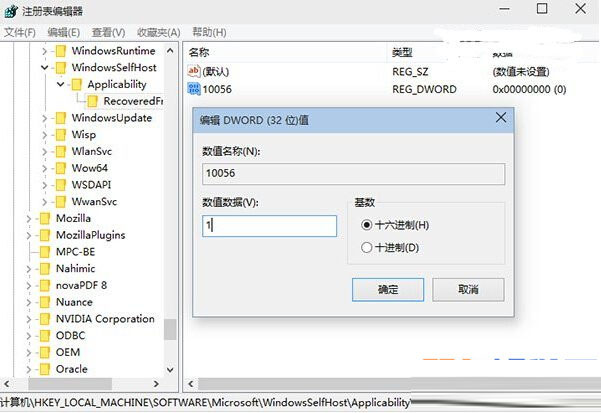
  3. 新增 DWORD 值,名稱 = 版本號(如 10586),數值 = 1。

解封:刪除 DWORD 值。注意:此法僅能封鎖已知版本號,微軟推出新版需重複操作。正式版建議使用「暫停更新 35 天」(設定→更新與安全性→Windows Update→進階選項)或企業版群組原則延遲功能,更符合官方設計路徑。

Copyright © Windows教程網 All Rights Reserved