加入 Windows Insider 計畫前,請先了解 10 項關鍵提醒:
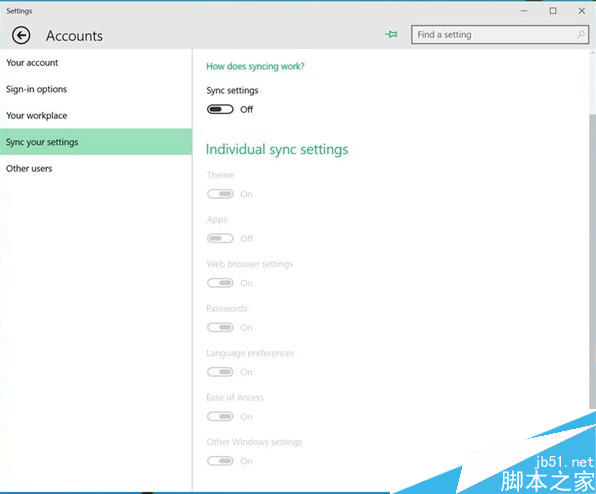
- 關閉同步:設定 → 帳戶 → 同步您的設定 → 關閉。避免舊設定干擾測試環境。
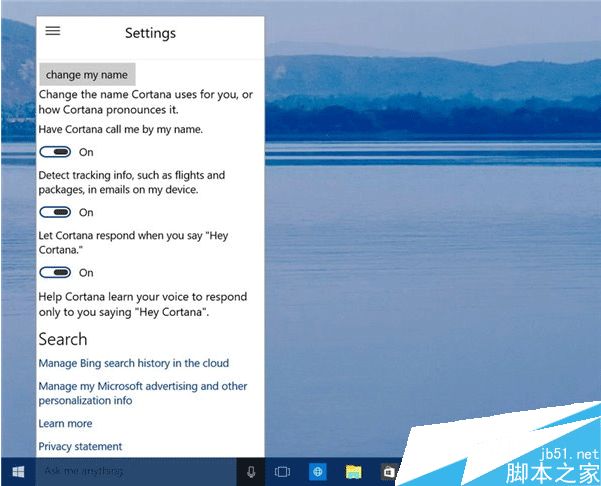
- 啟用 Cortana:點擊工作列搜尋框 → 允許 → 設定稱呼。若要用「Hey Cortana」需在設定開啟語音喚醒。
- 備份重要資料:預覽版不穩定,隨時可能遺失資料。
- 使用 Microsoft 帳戶登入:才能接收 Insider 更新。
- 安裝反饋 Hub:主動回報 Bug,改善系統。
- 預期頻繁更新:Fast Ring 更新極頻繁,需有心理準備。
- 了解版本過期機制:舊 Build 會強制重啟並要求更新,過期無法開機。
- 準備恢復磁碟:隨時可重裝或修復。
- 不要在主力機安裝:建議使用虛擬機或備用裝置。
- 耐心等待正式版:預覽版僅供測試,非生產環境就緒。
Cortana 自 Build 10041 起已在中、英、法、德、義市場開放。