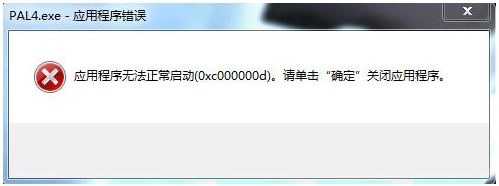
Win7 運行遊戲彈出 0xc000007d 錯誤,通常因 DirectX 9.0c 缺失/損壞、缺 32 位 DirectX 檔案、VC++ 運行庫缺失或顯卡驅動過舊。
無法直接定位單一原因,需逐項測試上述方案。
Windows Server 2008 R2 RODC 部署規劃全攻略:唯讀網域控制器設計考量
Win8.1 Mouse without Borders 滑鼠失效「無法連線找不到主機」?官方修復工具自動修復
Win10右鍵菜單WinRAR選項過多?一鍵合並為級聯菜單讓介面清爽
解決 Win7 筆電提示「請考慮更換電池」:重裝電池驅動或校準電量
Win8.1 點擊「立即升級 Win10」閃退?卸載殺毒軟體、清除 SoftwareDistribution 快取重試
Windows 建立家庭群組必開服務與協定完整檢查清單
Win10 離線安裝 .NET Framework 3.5 圖文教程:使用 DISM 與安裝映像快速部署
Win10 RS1 技術預覽版 11103 介面曝光:含 Edge、Cortana、應用商店、平板模式