Win8 預設同一視窗開啟多資料夾,若失效可嘗試:
regedit → 定位 HKEY_CLASSES_ROOT\Directory\shell → 將預設值改為 none。sfc /scannow 自動修復損毀系統檔。regsvr32 "%SystemRoot%\System32\actxprxy.dll"regsvr32 "%ProgramFiles%\Internet Explorer\ieproxy.dll"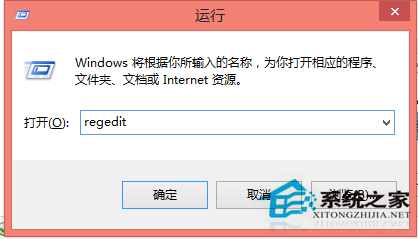
三種方法皆簡單有效,建議依序嘗試。
Win10 無法解除安裝程式提示「請等待目前程式完成解除安裝」?登出重新登入 或 結束 dllhost.exe 處理程序兩法解決
Windows 7 本機群組原則編輯器打不開 註冊表修復 Restrict_Run 值恢復存取
Windows 8 完整快捷鍵大全:常用、進階、檔案總管、對話方塊、工作列、放大鏡、遠端桌面、畫圖、寫字板
Win7 禁止開機啟動項與軟體自動運行:msconfig 精簡啟動項、大勢至 USB 管理軟體強力阻擋流氓軟體
Win 10 取消開機密碼後出現雙帳號怎麼辦?一招修正帳號名稱解決
Win8/8.1 如何設定開機直接進入桌面而非 Metro 開始畫面?任務列導航頁籤勾選「登入時轉到桌面」